

Non-Reward App

Project Setup

1

Project-level build configuration

Change the daro-plugin dependency.
Latest version
  • daro-plugin :
buildscript {
    repositories {
        google()
        mavenCentral()
    }
    dependencies {
        // as-is
        // classpath("com.github.delightroom:daro-android-plugin:0.4.4")

        // to-be
        classpath("so.daro:daro-plugin:{version}")
    }
}
2

Apply the DARO plugin to build.gradle(app)

plugins {
    ...
    // as-is
    // id("droom.daro.a")

    // to-be
    id("so.daro.a")
    ...
}
3

Key file setup

  • General
  • If separate configuration per flavor is needed
  1. Delete daro-services.json and download daro-key.txt and add it as follows.
app/
└── daro-key.txt
  1. Configure daroAppKey.
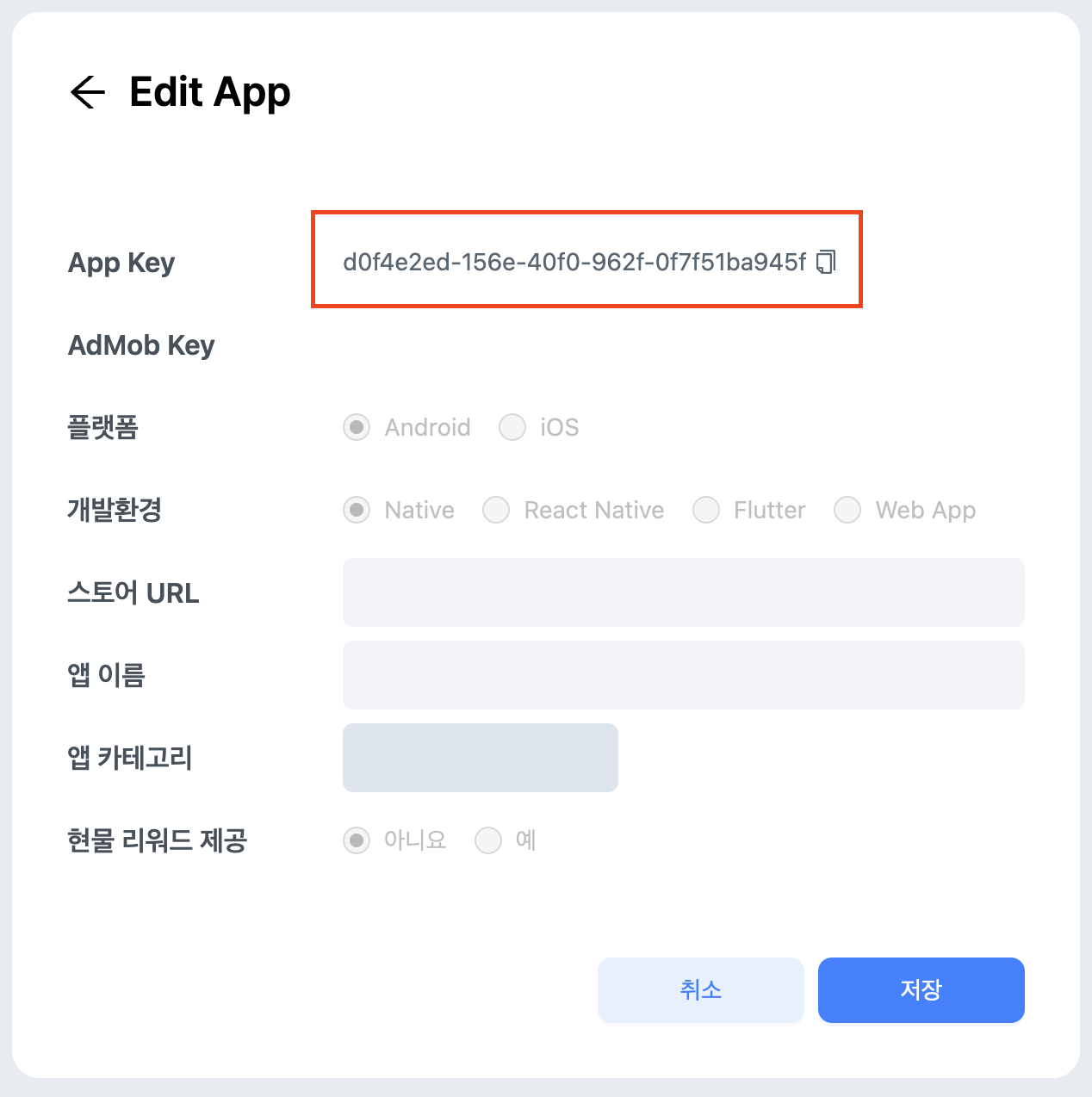
daro-key.txt can be downloaded from the DARO dashboard.
daroAppKey can be found in the DARO dashboard.daroAppKey
4

Add Daro SDK dependency

The required SDK and versions change as follows.
Latest version
  • daro-core :
  • daro-a :
  • daro-compose-util :
dependencies {
    ...
    //as-is
    // implementation("com.github.delightroom:daro-android:0.x.x")

    //to-be
    implementation("so.daro:daro-core:{version}")
    implementation("so.daro:daro-a:{version}")

    implementation("so.daro:daro-compose-util:{version}") // Compose-Only
    ...
}
Both daro-core and daro-a must be implemented.
By adding the daro-compose-util module dependency, you can use ads in Compose.

Implementing Code

1

SDK initialization changes

The Daro SDK initialization method changes.
import android.app.Application
// import droom.daro.lib.Daro
import droom.daro.Daro
import kotlinx.coroutines.CoroutineScope

class SampleApp: Application() {

        override fun onCreate() {
        super.onCreate()

        // CoroutinScope.launch {
        //    Daro.init(application = this@SampleApp,)
        //}
        Daro.init(application = this@SampleApp)
    }
}
  • The package for the Daro class has changed.
    • droom.daro.lib.Daro -> droom.daro.Daro
  • Instead of calling in a Coroutine, it can be called directly on the main thread.
Support for DaroNetworkConfiguration and DaroLogLevel settings has been discontinued.
2

Change Ad Unit ID used for ad loading

The Ad Unit ID used previously cannot be used in the new SDK.
Please get the new Ad Unit ID from the Daro dashboard and apply it to your code.
Using the existing Ad Unit ID will cause ad loading to fail. Be sure to replace the Ad Unit ID.
3

Change ad implementation logic

Reward App

Project Setup

1

Project-level build configuration

Change the daro-plugin dependency.
Latest version
  • daro-plugin :
buildscript {
    repositories {
        google()
        mavenCentral()
        maven { url = uri("https://artifacts.applovin.com/android") }
    }
    dependencies {
        // as-is
        // classpath("com.github.delightroom:daro-android-plugin:0.4.4")

        // to-be
        classpath("so.daro:daro-plugin:{version}")
        classpath("com.applovin.quality:AppLovinQualityServiceGradlePlugin:5.5.2")
    }
}
2

Apply the DARO plugin to build.gradle(app)

plugins {
    ...
    // as-is
    // id("droom.daro.m")

    // to-be
    id("so.daro.m")
    ...
}
3

Key file setup

  • General
  • If separate configuration per flavor is needed
  1. Delete daro-services.json and download daro-key.txt and add it as follows.
app/
└── daro-key.txt
  1. Configure daroAppKey.
daro-key.txt can be downloaded from the DARO dashboard.
daroAppKey can be found in the DARO dashboard.daroAppKey
4

Add Daro SDK dependency

The required SDK and versions change as follows.
Latest version
  • daro-core :
  • daro-m :
  • daro-compose-util :
dependencies {
    ...
    //as-is
    // implementation("com.github.delightroom:daro-android-m:0.x.x")

    //to-be
    implementation("so.daro:daro-core:{version}")
    implementation("so.daro:daro-m:{version}")

    implementation("so.daro:daro-compose-util:{version}") // Compose-Only
    ...
}
Both daro-core and daro-m must be implemented.
By adding the daro-compose-util module dependency, you can use ads in Compose.

Implementing Code

1

SDK initialization changes

The package for the Daro class has changed.
  • droom.daro.m.Daro -> droom.daro.Daro
Support for DaroLogLevel setting has been discontinued.
2

Change Ad Unit ID used for ad loading

The Ad Unit ID used previously cannot be used in the new SDK.
Please get the new Ad Unit ID from the Daro dashboard and apply it to your code.
Using the existing Ad Unit ID will cause ad loading to fail. Be sure to replace the Ad Unit ID.
3

Change ad implementation logic

Support for setting extraParameter and localExtraParameter has been discontinued for all ads.