

Native Ad Format

Native ads provide individual ad components that you implement directly in your app’s layout, unlike other formats where the SDK provides the complete ad view. Advantages: Customize the layout to match your UI/UX and minimize visual disruption. Requirements: Include an ad indicator and maintain visual differentiation to prevent users from confusing ads with content. Native Example Elements En Pn
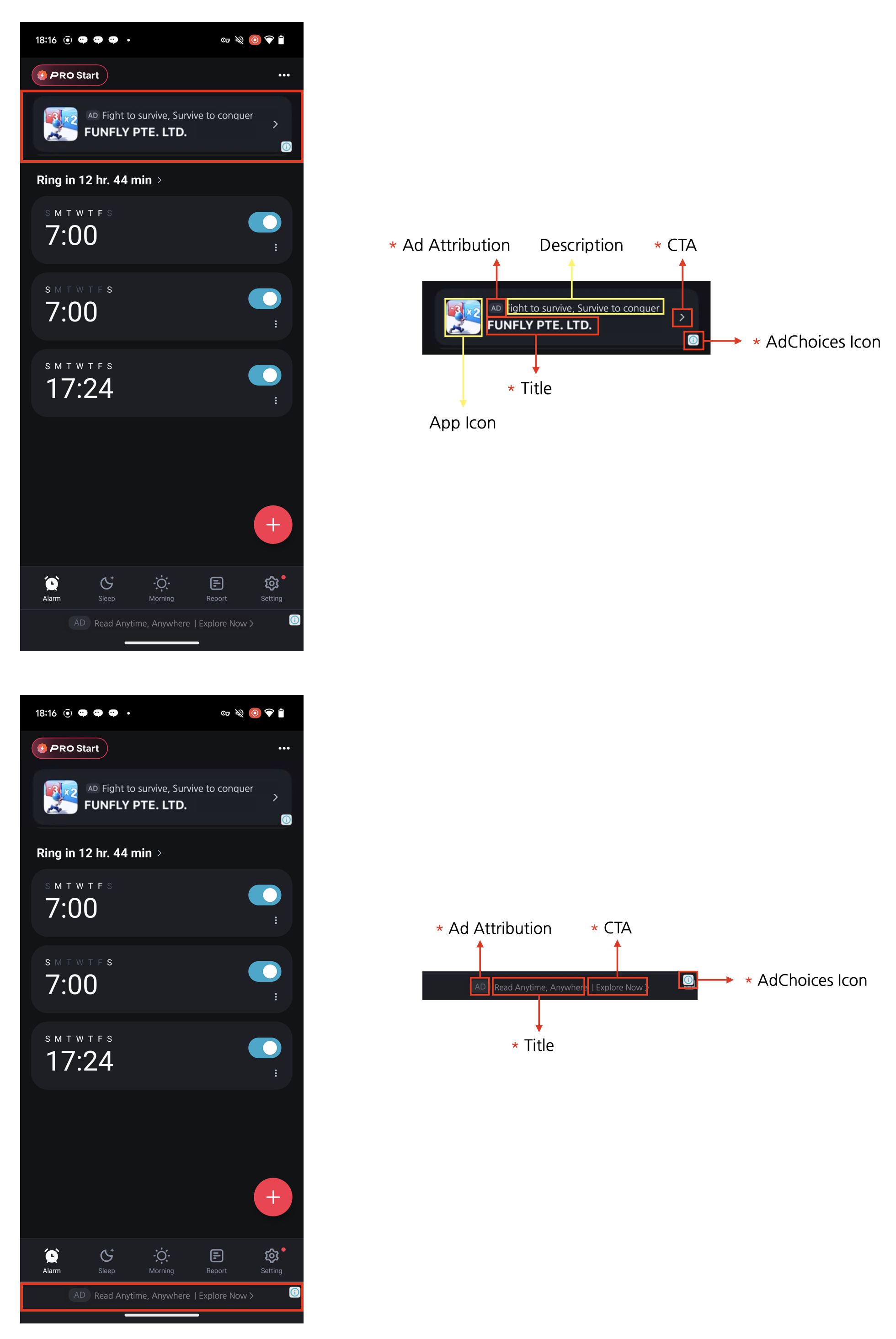
Four Required Elements for Native AdsNative ads can be designed to complement the content and look of your app. However, the following four required elements must be included. These elements are necessary to clearly mark native ads as advertisements so that users don’t mistake them for content, and to ensure the minimum advertising effectiveness expected by advertisers.
  1. Ad attribution: You must clearly display ad attribution text such as “Ad”, “Advertisement”, or “Sponsored” (localized appropriately) in the ad area so users can clearly identify the content as advertising.
  2. AdChoices icon: The AdChoices overlay icon enables users to identify and control ads, typically displayed as an ’ⓘ’ icon. This icon is automatically added by the DARO SDK, so no separate implementation is required. However, it’s important that the AdChoices overlay be easily seen, so design your ad view to ensure the icon is not obscured by other UI elements. The icon’s appearance and behavior may vary depending on the ad source (demand).
  3. Title: The ad title must be displayed.
  4. CTA (Call to action): A CTA button with text such as “Install”, “Open”, or “Download” must be included. The size and format of the button can be freely configured, and it can be replaced with a text field depending on the situation. Since the ad source (demand) provides the CTA text, there is no need to specify fixed wording.

Creating Native View Components

  • Non-Reward
  • Reward
import { NativeAdView, TitleView, AdvertiserView, BodyView, CallToActionView, IconView, OptionsView, MediaView, StarRatingView } from 'react-native-daro';
import type { AdInfo, AdLoadFailedInfo, NativeAdViewHandler } from 'react-native-daro';
import { useRef, useState } from 'react';
import { Platform, StyleSheet, View } from 'react-native';
// For import statements, refer to the tabs above
import { NativeAdView, TitleView, AdvertiserView, BodyView, CallToActionView, IconView, OptionsView, MediaView, StarRatingView } from 'react-native-daro-m';
import type { AdInfo, AdLoadFailedInfo, NativeAdViewHandler } from 'react-native-daro-m';
import { AppButton } from './components/AppButton';

type Props = {
  adUnitId: string;
  isInitialized: boolean;
  log: (str: string) => void;
  isNativeAdShowing: boolean;
  setIsNativeAdShowing: (showing: boolean) => void;
};

const NATIVE_AD_MEDIAVIEW_WIDTH = 340;
const NATIVE_AD_MEDIAVIEW_HEIGHT = 200;

export const NativeAdViewExample = ({ adUnitId, isInitialized, log, isNativeAdShowing, setIsNativeAdShowing }: Props) => {
  const [isNativeAdLoading, setIsNativeAdLoading] = useState(false);

  // Ref for NativeAdView
  const nativeAdViewRef = useRef<NativeAdViewHandler>(null);

  return (
    <>
      <AppButton
        style={styles.button}
        title={isNativeAdShowing ? 'Hide Native Ad' : 'Show Native Ad'}
        enabled={isInitialized}
        onPress={() => {
          setIsNativeAdShowing(!isNativeAdShowing);
        }}
      />

      {isNativeAdShowing && (
        <View style={styles.container}>
          <NativeAdView
            adUnitId={adUnitId}
            ref={nativeAdViewRef}
            style={styles.nativeAd}
            onAdLoaded={(adInfo: AdInfo) => {
              log('Native ad loaded from ' + adInfo);
              setIsNativeAdLoading(false);
            }}
            onAdLoadFailed={(errorInfo: AdLoadFailedInfo) => {
              log('Native ad failed to load with error code ' + errorInfo.code + ' and message: ' + errorInfo.message);
              setIsNativeAdLoading(false);
            }}
            onAdClicked={(adInfo: AdInfo) => {
              log('Native ad clicked on ' + adInfo.adUnitId);
            }}
            onAdImpressionRecorded={(adInfo: AdInfo) => {
              log('Native ad impression recorded');
            }}
          >
            <View style={styles.assetContainer}>
              <View style={styles.assetUpperContainer}>
                <IconView style={styles.icon} />
                <View style={styles.assetTitleContainer}>
                  <TitleView style={styles.title} />
                </View>
              </View>
              <BodyView style={styles.body} />
              <MediaView style={{ ...styles.mediaView }} />
              <CallToActionView style={styles.callToAction} />
            </View>
          </NativeAdView>
          <AppButton
            style={styles.button}
            title={'RELOAD'}
            enabled={!isNativeAdLoading}
            onPress={() => {
              setIsNativeAdLoading(true);
              nativeAdViewRef.current?.loadAd();
            }}
          />
          <AppButton
            style={styles.button}
            title={'CLOSE'}
            enabled={!isNativeAdLoading}
            onPress={() => {
              setIsNativeAdShowing(!isNativeAdShowing);
            }}
          />
        </View>
      )}
    </>
  );
};

const styles = StyleSheet.create({
  button: {
    margin: 5,
    backgroundColor: '#0583aa',
  },
  container: {
    position: 'absolute', // must have a view behind for touch event propagation
    top: '30%',
    width: '100%',
    padding: 10,
    backgroundColor: '#0583aa',
    zIndex: 1,
    elevation: Platform.OS === 'android' ? 1 : 0,
  },
  nativeAd: {
    padding: 10,
    width: '100%',
    backgroundColor: '#EFEFEF',
  },
  icon: {
    width: 48,
    height: 48,
  },
  title: {
    width: 260,
    fontSize: 16,
    textAlign: 'left',
    fontWeight: 'bold',
    color: 'black',
  },
  body: {
    padding: 8,
    fontSize: 14,
    textAlign: 'center',
    textAlignVertical: 'center',
  },
  mediaView: {
    alignSelf: 'center',
    width: NATIVE_AD_MEDIAVIEW_WIDTH,
    height: NATIVE_AD_MEDIAVIEW_HEIGHT,
    maxWidth: NATIVE_AD_MEDIAVIEW_WIDTH,
    maxHeight: NATIVE_AD_MEDIAVIEW_HEIGHT,
    zIndex: 1,
    elevation: Platform.OS === 'android' ? 1 : 0,
  },
  callToAction: {
    marginTop: 10,
    padding: 8,
    width: '100%',
    fontSize: 18,
    textAlign: 'center',
    fontWeight: 'bold',
    textTransform: 'uppercase',
    color: 'black',
    backgroundColor: '#2d545e',
  },
  assetContainer: {
    flex: 1,
    flexDirection: 'column',
    justifyContent: 'space-between',
  },
  assetUpperContainer: {
    flexDirection: 'row',
    justifyContent: 'space-between',
  },
  assetTitleContainer: {
    marginLeft: 4,
    flexDirection: 'column',
    flexGrow: 1,
  },
});

export default NativeAdViewExample;
  • When using the same AdUnitId across multiple placements, be sure to enter a placement to distinguish each placement.

Precautions

Conditional Rendering of Ad Components

Child ad components of NativeAdView (IconView, TitleView, CallToActionView, etc.) must exist in the DOM. If ad components are hidden with conditional rendering, they will not be displayed even when the ad is loaded.