

Light Popup Ad Format
Full-screen ad format that automatically closes after 8 seconds. Less disruptive to UX than interstitial or rewarded video ads.- Android Light Popup Example
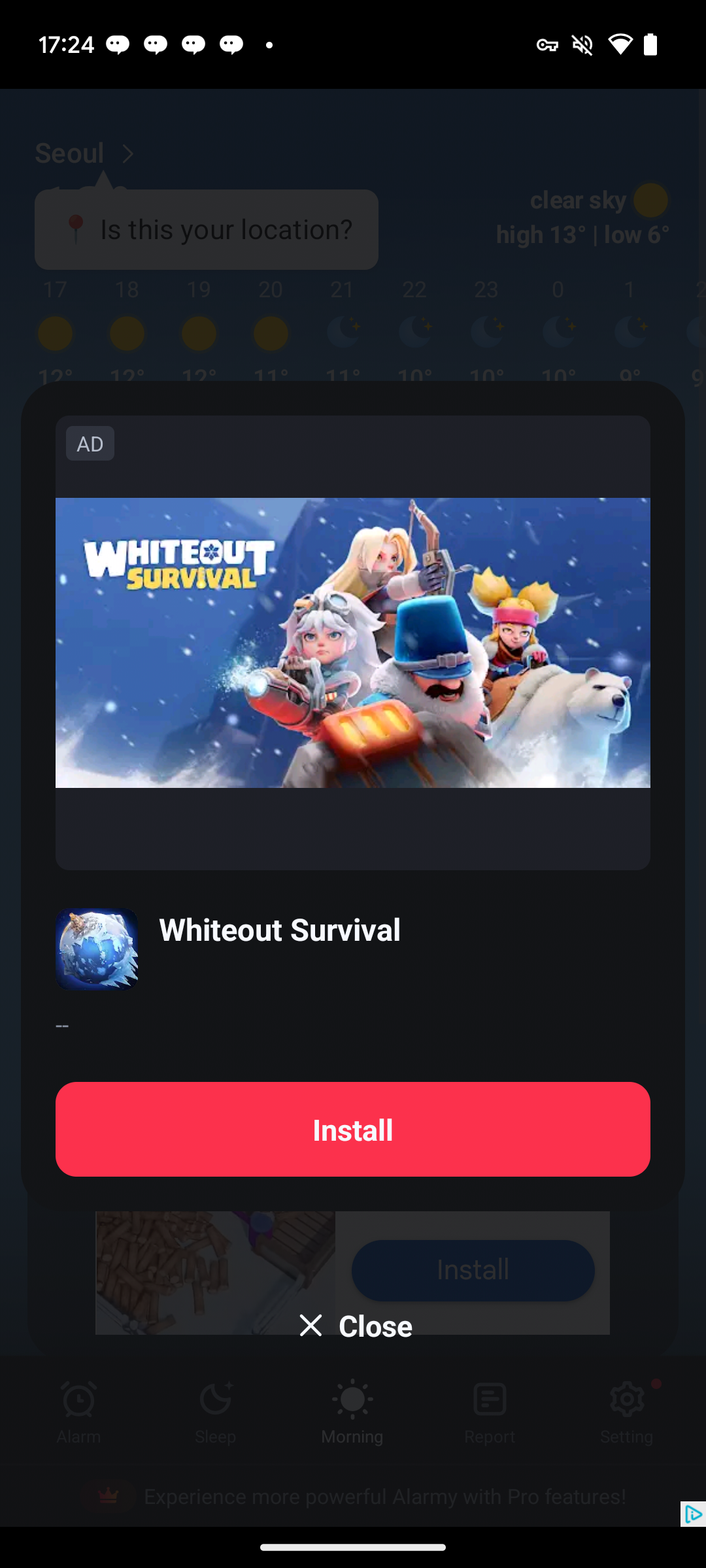
- iOS Light Popup Example

Loading Ads
You can load ads throughLightPopupAd.loadAd(unitId).
- Non-Reward
- Reward
import { LightPopupAd } from "react-native-daro";
import { LightPopupAd } from "react-native-daro-m";
const LIGHT_POPUP_AD_UNIT_ID = Platform.select({
  ios: ${iOS unit id},
  android: ${Android unit id},
  default: ''
});

LightPopupAd.loadAd(LIGHT_POPUP_AD_UNIT_ID);
Showing Ads
You can show loaded ads throughLightPopupAd.showAd(unitId).
const isReady = await LightPopupAd.isAdReady(LIGHT_POPUP_AD_UNIT_ID);

if (isReady) {
  LightPopupAd.showAd(LIGHT_POPUP_AD_UNIT_ID);
}
Implementation Example
This is an example implementation of `LightPopupAd`.
This is an example implementation of `LightPopupAd`.
import { useEffect, useRef, useState } from "react";
import { StyleSheet } from "react-native";
// For import statements, refer to the tabs above
import { AdDisplayFailedInfo, AdInfo, AdLoadFailedInfo, AdRevenueInfo, LightPopupAd } from "react-native-daro-m";
import { ThemedButton } from "../ThemedButton";
enum AdLoadState {
  notLoaded = 'NOT_LOADED',
  loading = 'LOADING',
  loaded = 'LOADED',
}

type Props = {
  adUnitId: string;
  isInitialized: boolean;
  log: (str: string) => void;
};

const MAX_EXPONENTIAL_RETRY_COUNT = 3;

const LightPopupAdExample = ({ adUnitId, isInitialized, log }: Props) => {
  const [adLoadState, setAdLoadState] = useState<AdLoadState>(AdLoadState.notLoaded);
  const retryAttempt = useRef(0);

  useEffect(() => {

    LightPopupAd.addAdLoadedEventListener((adInfo: AdInfo) => {
      setAdLoadState(AdLoadState.loaded);
      retryAttempt.current = 0;
      log(`LightPopup ad loaded`);
    });

    LightPopupAd.addAdImpressionRecordedListener((adInfo: AdInfo) => {
      log(`LightPopup ad revenue paid`);
    });

    LightPopupAd.addAdClickedEventListener((adInfo: AdInfo) => {
      log(`LightPopup ad clicked`);
    });

    // Handle ad load failure
    LightPopupAd.addAdLoadFailedEventListener((errorInfo: AdLoadFailedInfo) => {
      setAdLoadState(AdLoadState.notLoaded);

      if (retryAttempt.current > MAX_EXPONENTIAL_RETRY_COUNT) {
        log('LightPopup ad failed to load with code ' + errorInfo.code);
        return;
      }

      // LightPopup ad failed to load
      // We recommend retrying with exponentially higher delays up to a maximum delay (in this case 64 seconds)
      retryAttempt.current += 1;

      const retryDelay = Math.pow(2, Math.min(MAX_EXPONENTIAL_RETRY_COUNT, retryAttempt.current));
      log('LightPopup ad failed to load with code ' + errorInfo.code + ' - retrying in ' + retryDelay + 's');

      setTimeout(() => {
        setAdLoadState(AdLoadState.loading);
        log('LightPopup ad retrying to load...');
        LightPopupAd.loadAd(adUnitId);
      }, retryDelay * 1000);
    });

    LightPopupAd.addAdDisplayedEventListener((adInfo: AdInfo) => {
      log(`LightPopup ad displayed`);
    });

    LightPopupAd.addAdFailedToDisplayEventListener?.((adInfo: AdDisplayFailedInfo) => {
      setAdLoadState(AdLoadState.notLoaded);
      log(`LightPopup ad failed to display`);
    });

    LightPopupAd.addAdHiddenEventListener?.((adInfo: AdInfo) => {
      setAdLoadState(AdLoadState.notLoaded);
      log(`LightPopup ad hidden`);
    });

    LightPopupAd.setLightPopupAdConfiguration(adUnitId, {
      backgroundColor: 'blue',
      cardViewBackgroundColor: 'yellow',
      adMarkLabelTextColor: 'red',
      adMarkLabelBackgroundColor: '#FFD700',
      closeButtonText: 'Close AD',
      closeButtonTextColor: 'rgba(0, 255, 255, 0.42)',
      titleTextColor: 'rgba(0, 128, 255, 0.42)',
      bodyTextColor: '#333333',
      ctaButtonTextColor: 'blue',
      ctaButtonBackgroundColor: '#4CAF50',
    });

  }, [adUnitId]);

  const getLightPopupButtonTitle = () => {
    if (adLoadState === AdLoadState.notLoaded) {
      return 'Load LightPopup';
    } else if (adLoadState === AdLoadState.loading) {
      return 'Loading...';
    } else {
      return 'Show LightPopup'; // adLoadState.loaded
    }
  };
  return (
    <AppButton style={styles.button} enabled={isInitialized && adLoadState !== AdLoadState.loading} title={getLightPopupButtonTitle()} onPress={async () => {
      const isLightPopupReady = await LightPopupAd.isAdReady(adUnitId);
      if (isLightPopupReady) {
        LightPopupAd.showAd(adUnitId);
      } else {
        log('Loading LightPopup ad...');
        setAdLoadState(AdLoadState.loading);
        LightPopupAd.loadAd(adUnitId);
      }
    }} />
  );
}

const styles = StyleSheet.create({
  button: {
    margin: 5,
  },
});

export default LightPopupAdExample;
Ad Customization
You can customize UI elements such as colors and text throughLightPopupAd.setLightPopupAdConfiguration(adUnitId, options).
LightPopupAd.setLightPopupAdConfiguration(adUnitId, {
  backgroundColor: 'blue', // Overall background color
  cardViewBackgroundColor: 'yellow', // Card background color
  adMarkLabelTextColor: 'red', // Ad mark text color
  adMarkLabelBackgroundColor: '#FFD700', // Ad mark background color
  closeButtonText: 'Close AD', // Close button text
  closeButtonTextColor: 'rgba(0, 255, 255, 0.42)', // Close button text color
  titleTextColor: 'rgba(0, 128, 255, 0.42)', // Title color
  bodyTextColor: '#333333', // Body text color
  ctaButtonTextColor: 'blue', // CTA button text color
  ctaButtonBackgroundColor: '#4CAF50', // CTA button background color
});