

This page covers existing integrations with SDK versions before 2.0.0. For a new integration or an update to 2.0, use the SDK 2.0 integration guide.
Before You Begin
SDK Initialization RequiredLoad or render all ad formats only after SDK initialization completes. Rendering before initialization causes:
AdBannerView | NativeAdView is mounted before the initialization of the DaroM React Native moduleApplies to all formats: banner, native, interstitial, rewarded.Requirements
- Android minSdkVersion: 23
- iOS 15.1 or higher
Verify app-ads.txt settings before proceeding.
App Setup
Follow setup steps for your ad type (Non-Reward or Reward) confirmed in Before Integration.If using daro-m, select Reward tab.
Add npm Package
Install appropriate package:- Non-Reward
- Reward
npm i react-native-daro
npm i react-native-daro-m
Android Project Setup
- Android minSdkVersion: 23
Desugaring required: Configure desugaring if minSdk is below 26.
android {
    ...

    compileOptions {
        isCoreLibraryDesugaringEnabled = true
        sourceCompatibility = JavaVersion.VERSION_1_8
        targetCompatibility = JavaVersion.VERSION_1_8
    }

    ...
}

...

dependencies {
    ...

    coreLibraryDesugaring("com.android.tools:desugar_jdk_libs:2.0.4")

    ...
}
android {
    ...

    compileOptions {
        coreLibraryDesugaringEnabled true
        sourceCompatibility JavaVersion.VERSION_1_8
        targetCompatibility JavaVersion.VERSION_1_8
    }

    ...
}

...

dependencies {
    ...

    coreLibraryDesugaring 'com.android.tools:desugar_jdk_libs:2.0.4'

    ...
}
Android Project Setup
Android Project Setup
1
Project-level Build Configuration
- Add maven repositories to the
settings.gradlefile.
- Non-Reward
- Reward
dependencyResolutionManagement {
    repositoriesMode.set(RepositoriesMode.FAIL_ON_PROJECT_REPOS)
    repositories {
        ...
        maven { url = uri("https://artifact.bytedance.com/repository/pangle") }
        maven { url = uri("https://verve.jfrog.io/artifactory/verve-gradle-release") }
        maven { url = uri("https://cboost.jfrog.io/artifactory/chartboost-ads/") }
        maven { url = uri("https://repo.premiumads.net/artifactory/mobile-ads-sdk/") }
        maven { url = uri("https://repo.pubmatic.com/artifactory/public-repos") }
        maven { url = uri("https://s3.amazonaws.com/smaato-sdk-releases/") }
        maven { url = uri("https://android-sdk.is.com/") }
        maven { url = uri("https://dl-maven-android.mintegral.com/repository/mbridge_android_sdk_oversea") }
    }
}
allprojects {
    repositories {
        ...
        maven { url 'https://artifact.bytedance.com/repository/pangle' }
        maven { url 'https://verve.jfrog.io/artifactory/verve-gradle-release' }
        maven { url 'https://cboost.jfrog.io/artifactory/chartboost-ads/' }
        maven { url 'https://repo.premiumads.net/artifactory/mobile-ads-sdk/' }
        maven { url 'https://repo.pubmatic.com/artifactory/public-repos' }
        maven { url 'https://s3.amazonaws.com/smaato-sdk-releases/' }
        maven { url 'https://android-sdk.is.com/' }
        maven { url 'https://dl-maven-android.mintegral.com/repository/mbridge_android_sdk_oversea' }
    }
}
dependencyResolutionManagement {
    repositoriesMode.set(RepositoriesMode.FAIL_ON_PROJECT_REPOS)
    repositories {
        ...
        maven { url = uri("https://android-sdk.is.com") }
        maven { url = uri("https://dl-maven-android.mintegral.com/repository/mbridge_android_sdk_oversea") }
        maven { url = uri("https://maven.ogury.co") }
        maven { url = uri("https://artifact.bytedance.com/repository/pangle") }
        maven { url = uri("https://s3.amazonaws.com/smaato-sdk-releases/") }
        maven { url = uri("https://verve.jfrog.io/artifactory/verve-gradle-release") }
        maven { url = uri("https://cboost.jfrog.io/artifactory/chartboost-ads/") }
        maven { url = uri("https://artifacts.applovin.com/android") }
    }
}
allprojects {
    repositories {
        ...
        maven { url 'https://android-sdk.is.com' }
        maven { url 'https://dl-maven-android.mintegral.com/repository/mbridge_android_sdk_oversea' }
        maven { url 'https://maven.ogury.co' }
        maven { url 'https://artifact.bytedance.com/repository/pangle' }
        maven { url 'https://s3.amazonaws.com/smaato-sdk-releases/' }
        maven { url 'https://verve.jfrog.io/artifactory/verve-gradle-release' }
        maven { url 'https://cboost.jfrog.io/artifactory/chartboost-ads/' }
        maven { url 'https://artifacts.applovin.com/android' }
    }
}
2
Add the DARO plugin to build.gradle(root)
- Add the DARO plugin to the
build.gradle(root)file.
Latest version
- daro-plugin: androidPlguinLatestVersion
- Non-Reward
- Reward
buildscript {
    repositories {
        google()
        mavenCentral()
    }
    dependencies {
        classpath("so.daro:daro-plugin:{version}")
    }
}
buildscript {
    repositories {
        google()
        mavenCentral()
    }
    dependencies {
        classpath 'so.daro:daro-plugin:{version}'
    }
}
buildscript {
    repositories {
        google()
        mavenCentral()
        maven { url = uri("https://artifacts.applovin.com/android") }
    }
    dependencies {
        classpath("so.daro:daro-plugin:{version}")
        classpath("com.applovin.quality:AppLovinQualityServiceGradlePlugin:5.5.2")
    }
}
buildscript {
    repositories {
        google()
        mavenCentral()
        maven { url 'https://artifacts.applovin.com/android' }
    }
    dependencies {
        classpath 'so.daro:daro-plugin:{version}'
        classpath 'com.applovin.quality:AppLovinQualityServiceGradlePlugin:5.5.2'
    }
}
3
Add Daro SDK
- Add the Daro SDK.
- Non-Reward
- Reward
Latest version
- daro-a: androidDaroLatestVersion
dependencies {
    ...
    implementation("so.daro:daro-a:{version}")
    ...
}
dependencies {
    ...
    implementation 'so.daro:daro-a:{version}'
    ...
}
Latest version
- daro-m: androidDaroMLatestVersion
dependencies {
    ...
    implementation("so.daro:daro-m:{version}")
    ...
}
dependencies {
    ...
    implementation 'so.daro:daro-m:{version}'
    ...
}
4
Add android-daro-key.txt file
- Add the
android-daro-key.txtfile.
- General
- If you need flavor/buildType separation
app/
└── android-daro-key.txt
app/
└── src/
    ├── EnvA/
    │   └── android-daro-key.txt
    └── EnvB/
        └── android-daro-key.txt
android-daro-key.txt can be downloaded from the DARO dashboard.5
Configure daroAppKey
- Configure the daroAppKey.
- General
- If you need flavor/buildType separation
Show Configure in gradle.properties
Show Configure in gradle.properties
android.useAndroidX=true
android.enableJetifier=true
daroAppKey={APP_KEY}
Show Configure directly in app module gradle
Show Configure directly in app module gradle
Configure the following in the app module build.gradle.
buildscript{
    extra["daroAppKey"] = "APP_KEY"
}
buildscript {
    ext.daroAppKey = "APP_KEY"
}
Show Configure in gradle.properties
Show Configure in gradle.properties
android.useAndroidX=true
android.enableJetifier=true
daroAppKey.EnvA={APP_KEY}
daroAppKey.EnvB={APP_KEY}
Show Configure directly in app module gradle
Show Configure directly in app module gradle
Configure the following in the app module build.gradle.
buildscript{
    extra["daroAppKey.EnvA"] = "APP_KEY"
    extra["daroAppKey.EnvB"] = "APP_KEY"
}
buildscript {
    ext.daroAppKey.EnvA = "APP_KEY"
    ext.daroAppKey.EnvB = "APP_KEY"
}
Please capitalize the first letter of Flavor
The daroAppKey can be found in the DARO dashboard.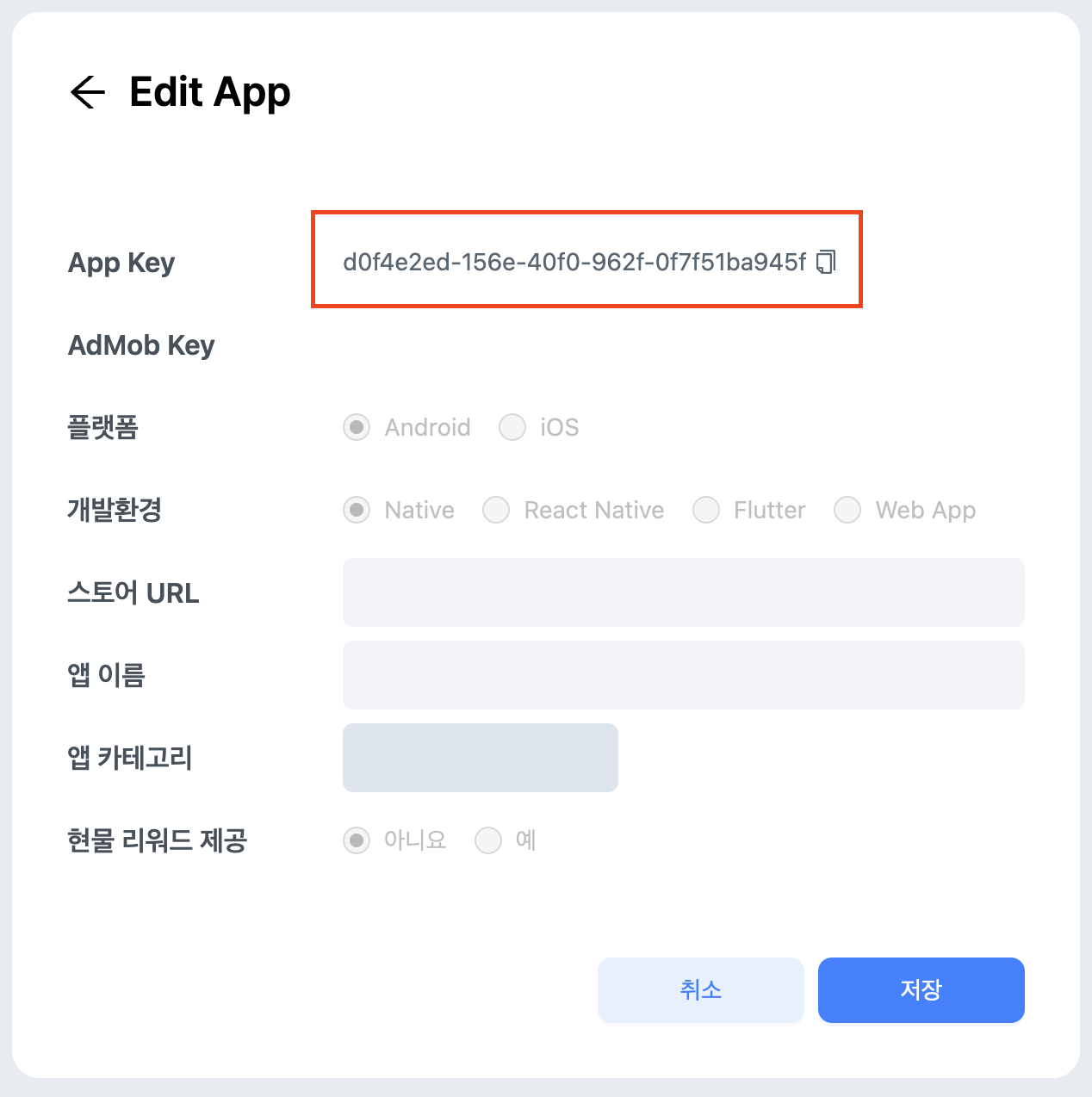
6
Apply the DARO plugin in build.gradle(app)
- Apply the DARO plugin in
build.gradle(app).
- Non-Reward
- Reward
plugins {
    ...
    id("so.daro.a")
    ...
}
plugins {
    ...
    id 'so.daro.a'
    ...
}
plugins {
    ...
    id("so.daro.m")
    ...
}
plugins {
    ...
    id 'so.daro.m'
    ...
}
7
Add proguard rules
- Add proguard rules.
- Non-Reward
- Reward
-keep class com.bytedance.sdk.** { *; }

-keepattributes Signature
-keep class net.pubnative.** { *; }
-keep class com.iab.omid.library.pubnativenet.** { *; }

-keep class com.amazon.** { *; }
-keep public class com.google.android.gms.ads.** {
    public *;
}
-keep class com.iabtcf.** {*;}

-keep public class com.smaato.sdk.** { *; }
    -keep public interface com.smaato.sdk.** { *; }

-keepclassmembers class * implements android.os.Parcelable {
    public static final android.os.Parcelable$Creator *;
}

-keep class com.ironsource.adapters.** { *; }

-dontwarn com.ironsource.**
-dontwarn com.ironsource.adapters.**
-keepclassmembers class com.ironsource.** { public *; }
-keep public class com.ironsource.**
-keep class com.ironsource.adapters.** { *;
}

-keepclassmembers class com.applovin.sdk.AppLovinSdk {
    static *;
}
-keep public interface com.applovin.sdk** {*; }
-keep public interface com.applovin.adview** {*; }
-keep public interface com.applovin.mediation** {*; }
-keep public interface com.applovin.communicator** {*; }

-keep class androidx.localbroadcastmanager.content.LocalBroadcastManager { *;}
-keep class androidx.recyclerview.widget.RecyclerView { *;}
-keep class androidx.recyclerview.widget.RecyclerView$OnScrollListener { *;}

-keep class * extends android.app.Activity

-flattenpackagehierarchy droom.daro.a

-keep public class droom.daro.** {
    public protected *;
}
-keep interface droom.daro.** {
    public protected *;
}

-keep,allowobfuscation,allowshrinking class kotlin.coroutines.Continuation
For Reward Apps, you don’t need to configure proguard separately.
iOS Project Setup
- iOS 15.1 or higher
- Xcode 14.0 or higher
iOS Project Setup
iOS Project Setup
-
Open
ios/PROJECT_NAME.xcworkspaceand add theios-daro-key.txtfile by drag and drop. ⚠️ Theios-daro-key.txtfile must be included in the project to initialize the SDK.GADApplicationIdentifier,DaroAppKeycan be found in the DARO dashboard (AdMob Key, App Key).❗ Please copy theSKAdNetworkItemsfrom Info.plist to your app’s Info.plist. If not registered, ad demand sources cannot receive conversion performance reports, which will reduce advertising efficiency. This has a significant impact on ad performance, so please add it! -
Add the following IDs to
Info.plist.<key>GADApplicationIdentifier</key> <string> /* Add the Admob Key issued from the DARO dashboard */ </string> <key>DaroAppKey</key> <string> /* Add the Daro App Key issued from the DARO dashboard */ </string> <key>SKAdNetworkItems</key> <array> <dict> <key>SKAdNetworkIdentifier</key> <string>cstr6suwn9.skadnetwork</string> </dict> <dict> <key>SKAdNetworkIdentifier</key> <string>4fzdc2evr5.skadnetwork</string> </dict> <dict> <key>SKAdNetworkIdentifier</key> <string>4pfyvq9l8r.skadnetwork</string> </dict> <dict> <key>SKAdNetworkIdentifier</key> <string>2fnua5tdw4.skadnetwork</string> </dict> <dict> <key>SKAdNetworkIdentifier</key> <string>ydx93a7ass.skadnetwork</string> </dict> <dict> <key>SKAdNetworkIdentifier</key> <string>5a6flpkh64.skadnetwork</string> </dict> <dict> <key>SKAdNetworkIdentifier</key> <string>p78axxw29g.skadnetwork</string> </dict> <dict> <key>SKAdNetworkIdentifier</key> <string>v72qych5uu.skadnetwork</string> </dict> <dict> <key>SKAdNetworkIdentifier</key> <string>ludvb6z3bs.skadnetwork</string> </dict> <dict> <key>SKAdNetworkIdentifier</key> <string>cp8zw746q7.skadnetwork</string> </dict> <dict> <key>SKAdNetworkIdentifier</key> <string>3sh42y64q3.skadnetwork</string> </dict> <dict> <key>SKAdNetworkIdentifier</key> <string>c6k4g5qg8m.skadnetwork</string> </dict> <dict> <key>SKAdNetworkIdentifier</key> <string>s39g8k73mm.skadnetwork</string> </dict> <dict> <key>SKAdNetworkIdentifier</key> <string>3qy4746246.skadnetwork</string> </dict> <dict> <key>SKAdNetworkIdentifier</key> <string>f38h382jlk.skadnetwork</string> </dict> <dict> <key>SKAdNetworkIdentifier</key> <string>hs6bdukanm.skadnetwork</string> </dict> <dict> <key>SKAdNetworkIdentifier</key> <string>v4nxqhlyqp.skadnetwork</string> </dict> <dict> <key>SKAdNetworkIdentifier</key> <string>wzmmz9fp6w.skadnetwork</string> </dict> <dict> <key>SKAdNetworkIdentifier</key> <string>yclnxrl5pm.skadnetwork</string> </dict> <dict> <key>SKAdNetworkIdentifier</key> <string>t38b2kh725.skadnetwork</string> </dict> <dict> <key>SKAdNetworkIdentifier</key> <string>7ug5zh24hu.skadnetwork</string> </dict> <dict> <key>SKAdNetworkIdentifier</key> <string>gta9lk7p23.skadnetwork</string> </dict> <dict> <key>SKAdNetworkIdentifier</key> <string>vutu7akeur.skadnetwork</string> </dict> <dict> <key>SKAdNetworkIdentifier</key> <string>y5ghdn5j9k.skadnetwork</string> </dict> <dict> <key>SKAdNetworkIdentifier</key> <string>n6fk4nfna4.skadnetwork</string> </dict> <dict> <key>SKAdNetworkIdentifier</key> <string>v9wttpbfk9.skadnetwork</string> </dict> <dict> <key>SKAdNetworkIdentifier</key> <string>n38lu8286q.skadnetwork</string> </dict> <dict> <key>SKAdNetworkIdentifier</key> <string>47vhws6wlr.skadnetwork</string> </dict> <dict> <key>SKAdNetworkIdentifier</key> <string>kbd757ywx3.skadnetwork</string> </dict> <dict> <key>SKAdNetworkIdentifier</key> <string>9t245vhmpl.skadnetwork</string> </dict> <dict> <key>SKAdNetworkIdentifier</key> <string>eh6m2bh4zr.skadnetwork</string> </dict> <dict> <key>SKAdNetworkIdentifier</key> <string>a2p9lx4jpn.skadnetwork</string> </dict> <dict> <key>SKAdNetworkIdentifier</key> <string>22mmun2rn5.skadnetwork</string> </dict> <dict> <key>SKAdNetworkIdentifier</key> <string>4468km3ulz.skadnetwork</string> </dict> <dict> <key>SKAdNetworkIdentifier</key> <string>2u9pt9hc89.skadnetwork</string> </dict> <dict> <key>SKAdNetworkIdentifier</key> <string>8s468mfl3y.skadnetwork</string> </dict> <dict> <key>SKAdNetworkIdentifier</key> <string>klf5c3l5u5.skadnetwork</string> </dict> <dict> <key>SKAdNetworkIdentifier</key> <string>ppxm28t8ap.skadnetwork</string> </dict> <dict> <key>SKAdNetworkIdentifier</key> <string>ecpz2srf59.skadnetwork</string> </dict> <dict> <key>SKAdNetworkIdentifier</key> <string>uw77j35x4d.skadnetwork</string> </dict> <dict> <key>SKAdNetworkIdentifier</key> <string>pwa73g5rt2.skadnetwork</string> </dict> <dict> <key>SKAdNetworkIdentifier</key> <string>mlmmfzh3r3.skadnetwork</string> </dict> <dict> <key>SKAdNetworkIdentifier</key> <string>578prtvx9j.skadnetwork</string> </dict> <dict> <key>SKAdNetworkIdentifier</key> <string>4dzt52r2t5.skadnetwork</string> </dict> <dict> <key>SKAdNetworkIdentifier</key> <string>e5fvkxwrpn.skadnetwork</string> </dict> <dict> <key>SKAdNetworkIdentifier</key> <string>8c4e2ghe7u.skadnetwork</string> </dict> <dict> <key>SKAdNetworkIdentifier</key> <string>zq492l623r.skadnetwork</string> </dict> <dict> <key>SKAdNetworkIdentifier</key> <string>3rd42ekr43.skadnetwork</string> </dict> <dict> <key>SKAdNetworkIdentifier</key> <string>3qcr597p9d.skadnetwork</string> </dict> <dict> <key>SKAdNetworkIdentifier</key> <string>mj797d8u6f.skadnetwork</string> </dict> <dict> <key>SKAdNetworkIdentifier</key> <string>55644vm79v.skadnetwork</string> </dict> <dict> <key>SKAdNetworkIdentifier</key> <string>6yxyv74ff7.skadnetwork</string> </dict> <dict> <key>SKAdNetworkIdentifier</key> <string>55y65gfgn7.skadnetwork</string> </dict> <dict> <key>SKAdNetworkIdentifier</key> <string>cwn433xbcr.skadnetwork</string> </dict> <dict> <key>SKAdNetworkIdentifier</key> <string>nu4557a4je.skadnetwork</string> </dict> <dict> <key>SKAdNetworkIdentifier</key> <string>w7jznl3r6g.skadnetwork</string> </dict> <dict> <key>SKAdNetworkIdentifier</key> <string>577p5t736z.skadnetwork</string> </dict> <dict> <key>SKAdNetworkIdentifier</key> <string>6rd35atwn8.skadnetwork</string> </dict> <dict> <key>SKAdNetworkIdentifier</key> <string>7bxrt786m8.skadnetwork</string> </dict> <dict> <key>SKAdNetworkIdentifier</key> <string>7fbxrn65az.skadnetwork</string> </dict> <dict> <key>SKAdNetworkIdentifier</key> <string>dt3cjx1a9i.skadnetwork</string> </dict> <dict> <key>SKAdNetworkIdentifier</key> <string>fz2k2k5tej.skadnetwork</string> </dict> <dict> <key>SKAdNetworkIdentifier</key> <string>jk2fsx2rgz.skadnetwork</string> </dict> <dict> <key>SKAdNetworkIdentifier</key> <string>r8lj5b58b5.skadnetwork</string> </dict> <dict> <key>SKAdNetworkIdentifier</key> <string>tmhh9296z4.skadnetwork</string> </dict> <dict> <key>SKAdNetworkIdentifier</key> <string>k6y4y55b64.skadnetwork</string> </dict> <dict> <key>SKAdNetworkIdentifier</key> <string>qwpu75vrh2.skadnetwork</string> <dict> <key>SKAdNetworkIdentifier</key> <string>252b5q8x7y.skadnetwork</string> </dict> <dict> <key>SKAdNetworkIdentifier</key> <string>4mn522wn87.skadnetwork</string> </dict> <dict> <key>SKAdNetworkIdentifier</key> <string>7fmhfwg9en.skadnetwork</string> </dict> <dict> <key>SKAdNetworkIdentifier</key> <string>8r8llnkz5a.skadnetwork</string> </dict> <dict> <key>SKAdNetworkIdentifier</key> <string>dbu4b84rxf.skadnetwork</string> </dict> <dict> <key>SKAdNetworkIdentifier</key> <string>dkc879ngq3.skadnetwork</string> </dict> <dict> <key>SKAdNetworkIdentifier</key> <string>eh6m2bh4zr.skadnetwork</string> </dict> <dict> <key>SKAdNetworkIdentifier</key> <string>f7s53z58qe.skadnetwork</string> </dict> <dict> <key>SKAdNetworkIdentifier</key> <string>g6gcrrvk4p.skadnetwork</string> </dict> <dict> <key>SKAdNetworkIdentifier</key> <string>gta8lk7p23.skadnetwork</string> </dict> <dict> <key>SKAdNetworkIdentifier</key> <string>krvm3zuq6h.skadnetwork</string> </dict> <dict> <key>SKAdNetworkIdentifier</key> <string>lr83yxwka7.skadnetwork</string> </dict> <dict> <key>SKAdNetworkIdentifier</key> <string>mj797d8u6f.skadnetwork</string> </dict> <dict> <key>SKAdNetworkIdentifier</key> <string>qu637u8glc.skadnetwork</string> </dict> <dict> <key>SKAdNetworkIdentifier</key> <string>s69wq72ugq.skadnetwork</string> </dict> <dict> <key>SKAdNetworkIdentifier</key> <string>v79kvwwj4g.skadnetwork</string> </dict> <dict> <key>SKAdNetworkIdentifier</key> <string>vhf287vqwu.skadnetwork</string> </dict> <dict> <key>SKAdNetworkIdentifier</key> <string>vutu7akeur.skadnetwork</string> </dict> <dict> <key>SKAdNetworkIdentifier</key> <string>x5l83yy675.skadnetwork</string> </dict> <dict> <key>SKAdNetworkIdentifier</key> <string>x8jxxk4ff5.skadnetwork</string> </dict> <dict> <key>SKAdNetworkIdentifier</key> <string>x8uqf25wch.skadnetwork</string> </dict> <dict> <key>SKAdNetworkIdentifier</key> <string>xga6mpmplv.skadnetwork</string> </dict> <dict> <key>SKAdNetworkIdentifier</key> <string>ln5gz23vtd.skadnetwork</string> </dict> <dict> <key>SKAdNetworkIdentifier</key> <string>z959bm4gru.skadnetwork</string> </dict> </dict> <dict> <key>SKAdNetworkIdentifier</key> <string>238da6jt44.skadnetwork</string> </dict> <dict> <key>SKAdNetworkIdentifier</key> <string>24t9a8vw3c.skadnetwork</string> </dict> <dict> <key>SKAdNetworkIdentifier</key> <string>24zw6aqk47.skadnetwork</string> </dict> <dict> <key>SKAdNetworkIdentifier</key> <string>275upjj5gd.skadnetwork</string> </dict> <dict> <key>SKAdNetworkIdentifier</key> <string>294l99pt4k.skadnetwork</string> </dict> <dict> <key>SKAdNetworkIdentifier</key> <string>32z4fx6l9h.skadnetwork</string> </dict> <dict> <key>SKAdNetworkIdentifier</key> <string>3l6bd9hu43.skadnetwork</string> </dict> <dict> <key>SKAdNetworkIdentifier</key> <string>424m5254lk.skadnetwork</string> </dict> <dict> <key>SKAdNetworkIdentifier</key> <string>44jx6755aq.skadnetwork</string> </dict> <dict> <key>SKAdNetworkIdentifier</key> <string>44n7hlldy6.skadnetwork</string> </dict> <dict> <key>SKAdNetworkIdentifier</key> <string>488r3q3dtq.skadnetwork</string> </dict> <dict> <key>SKAdNetworkIdentifier</key> <string>4w7y6s5ca2.skadnetwork</string> </dict> <dict> <key>SKAdNetworkIdentifier</key> <string>523jb4fst2.skadnetwork</string> </dict> <dict> <key>SKAdNetworkIdentifier</key> <string>52fl2v3hgk.skadnetwork</string> </dict> <dict> <key>SKAdNetworkIdentifier</key> <string>54nzkqm89y.skadnetwork</string> </dict> <dict> <key>SKAdNetworkIdentifier</key> <string>5f5u5tfb26.skadnetwork</string> </dict> <dict> <key>SKAdNetworkIdentifier</key> <string>5l3tpt7t6e.skadnetwork</string> </dict> <dict> <key>SKAdNetworkIdentifier</key> <string>5lm9lj6jb7.skadnetwork</string> </dict> <dict> <key>SKAdNetworkIdentifier</key> <string>5tjdwbrq8w.skadnetwork</string> </dict> <dict> <key>SKAdNetworkIdentifier</key> <string>6964rsfnh4.skadnetwork</string> </dict> <dict> <key>SKAdNetworkIdentifier</key> <string>6g9af3uyq4.skadnetwork</string> </dict> <dict> <key>SKAdNetworkIdentifier</key> <string>6p4ks3rnbw.skadnetwork</string> </dict> <dict> <key>SKAdNetworkIdentifier</key> <string>6v7lgmsu45.skadnetwork</string> </dict> <dict> <key>SKAdNetworkIdentifier</key> <string>6xzpu9s2p8.skadnetwork</string> </dict> <dict> <key>SKAdNetworkIdentifier</key> <string>737z793b9f.skadnetwork</string> </dict> <dict> <key>SKAdNetworkIdentifier</key> <string>74b6s63p6l.skadnetwork</string> </dict> <dict> <key>SKAdNetworkIdentifier</key> <string>77y3x8wds4.skadnetwork</string> </dict> <dict> <key>SKAdNetworkIdentifier</key> <string>7953jerfzd.skadnetwork</string> </dict> <dict> <key>SKAdNetworkIdentifier</key> <string>79pbpufp6p.skadnetwork</string> </dict> <dict> <key>SKAdNetworkIdentifier</key> <string>7rz58n8ntl.skadnetwork</string> </dict> <dict> <key>SKAdNetworkIdentifier</key> <string>84993kbrcf.skadnetwork</string> </dict> <dict> <key>SKAdNetworkIdentifier</key> <string>87u5trcl3r.skadnetwork</string> </dict> <dict> <key>SKAdNetworkIdentifier</key> <string>89z7zv988g.skadnetwork</string> </dict> <dict> <key>SKAdNetworkIdentifier</key> <string>8m87ys6875.skadnetwork</string> </dict> <dict> <key>SKAdNetworkIdentifier</key> <string>97r2b46745.skadnetwork</string> </dict> <dict> <key>SKAdNetworkIdentifier</key> <string>9b89h5y424.skadnetwork</string> </dict> <dict> <key>SKAdNetworkIdentifier</key> <string>9g2aggbj52.skadnetwork</string> </dict> <dict> <key>SKAdNetworkIdentifier</key> <string>9nlqeag3gk.skadnetwork</string> </dict> <dict> <key>SKAdNetworkIdentifier</key> <string>9rd848q2bz.skadnetwork</string> </dict> <dict> <key>SKAdNetworkIdentifier</key> <string>9vvzujtq5s.skadnetwork</string> </dict> <dict> <key>SKAdNetworkIdentifier</key> <string>9yg77x724h.skadnetwork</string> </dict> <dict> <key>SKAdNetworkIdentifier</key> <string>a7xqa6mtl2.skadnetwork</string> </dict> <dict> <key>SKAdNetworkIdentifier</key> <string>a8cz6cu7e5.skadnetwork</string> </dict> <dict> <key>SKAdNetworkIdentifier</key> <string>apzhy3va96.skadnetwork</string> </dict> <dict> <key>SKAdNetworkIdentifier</key> <string>av6w8kgt66.skadnetwork</string> </dict> <dict> <key>SKAdNetworkIdentifier</key> <string>b9bk5wbcq9.skadnetwork</string> </dict> <dict> <key>SKAdNetworkIdentifier</key> <string>bvpn9ufa9b.skadnetwork</string> </dict> <dict> <key>SKAdNetworkIdentifier</key> <string>bxvub5ada5.skadnetwork</string> </dict> <dict> <key>SKAdNetworkIdentifier</key> <string>c3frkrj4fj.skadnetwork</string> </dict> <dict> <key>SKAdNetworkIdentifier</key> <string>ce8ybjwass.skadnetwork</string> </dict> <dict> <key>SKAdNetworkIdentifier</key> <string>cg4yq2srnc.skadnetwork</string> </dict> <dict> <key>SKAdNetworkIdentifier</key> <string>cj5566h2ga.skadnetwork</string> </dict> <dict> <key>SKAdNetworkIdentifier</key> <string>cs644xg564.skadnetwork</string> </dict> <dict> <key>SKAdNetworkIdentifier</key> <string>dzg6xy7pwj.skadnetwork</string> </dict> <dict> <key>SKAdNetworkIdentifier</key> <string>ejvt5qm6ak.skadnetwork</string> </dict> <dict> <key>SKAdNetworkIdentifier</key> <string>f2zub97jtl.skadnetwork</string> </dict> <dict> <key>SKAdNetworkIdentifier</key> <string>f73kdq92p3.skadnetwork</string> </dict> <dict> <key>SKAdNetworkIdentifier</key> <string>feyaarzu9v.skadnetwork</string> </dict> <dict> <key>SKAdNetworkIdentifier</key> <string>fq6vru337s.skadnetwork</string> </dict> <dict> <key>SKAdNetworkIdentifier</key> <string>g28c52eehv.skadnetwork</string> </dict> <dict> <key>SKAdNetworkIdentifier</key> <string>g2y4y55b64.skadnetwork</string> </dict> <dict> <key>SKAdNetworkIdentifier</key> <string>ggvn48r87g.skadnetwork</string> </dict> <dict> <key>SKAdNetworkIdentifier</key> <string>glqzh8vgby.skadnetwork</string> </dict> <dict> <key>SKAdNetworkIdentifier</key> <string>gvmwg8q7h5.skadnetwork</string> </dict> <dict> <key>SKAdNetworkIdentifier</key> <string>h65wbv5k3f.skadnetwork</string> </dict> <dict> <key>SKAdNetworkIdentifier</key> <string>hb56zgv37p.skadnetwork</string> </dict> <dict> <key>SKAdNetworkIdentifier</key> <string>hdw39hrw9y.skadnetwork</string> </dict> <dict> <key>SKAdNetworkIdentifier</key> <string>hjevpa356n.skadnetwork</string> </dict> <dict> <key>SKAdNetworkIdentifier</key> <string>k674qkevps.skadnetwork</string> </dict> <dict> <key>SKAdNetworkIdentifier</key> <string>kbmxgpxpgc.skadnetwork</string> </dict> <dict> <key>SKAdNetworkIdentifier</key> <string>m297p6643m.skadnetwork</string> </dict> <dict> <key>SKAdNetworkIdentifier</key> <string>m5mvw97r93.skadnetwork</string> </dict> <dict> <key>SKAdNetworkIdentifier</key> <string>m8dbw4sv7c.skadnetwork</string> </dict> <dict> <key>SKAdNetworkIdentifier</key> <string>mls7yz5dvl.skadnetwork</string> </dict> <dict> <key>SKAdNetworkIdentifier</key> <string>mp6xlyr22a.skadnetwork</string> </dict> <dict> <key>SKAdNetworkIdentifier</key> <string>mqn7fxpca7.skadnetwork</string> </dict> <dict> <key>SKAdNetworkIdentifier</key> <string>mtkv5xtk9e.skadnetwork</string> </dict> <dict> <key>SKAdNetworkIdentifier</key> <string>n66cz3y3bx.skadnetwork</string> </dict> <dict> <key>SKAdNetworkIdentifier</key> <string>n9x2a789qt.skadnetwork</string> </dict> <dict> <key>SKAdNetworkIdentifier</key> <string>ns5j362hk7.skadnetwork</string> </dict> <dict> <key>SKAdNetworkIdentifier</key> <string>nzq8sh4pbs.skadnetwork</string> </dict> <dict> <key>SKAdNetworkIdentifier</key> <string>p4ybsjem3u.skadnetwork</string> </dict> <dict> <key>SKAdNetworkIdentifier</key> <string>prcb7njmu6.skadnetwork</string> </dict> <dict> <key>SKAdNetworkIdentifier</key> <string>pu4na253f3.skadnetwork</string> </dict> <dict> <key>SKAdNetworkIdentifier</key> <string>pwdxu55a5a.skadnetwork</string> </dict> <dict> <key>SKAdNetworkIdentifier</key> <string>qqp299437r.skadnetwork</string> </dict> <dict> <key>SKAdNetworkIdentifier</key> <string>r45fhb6rf7.skadnetwork</string> </dict> <dict> <key>SKAdNetworkIdentifier</key> <string>rvh3l7un93.skadnetwork</string> </dict> <dict> <key>SKAdNetworkIdentifier</key> <string>rx5hdcabgc.skadnetwork</string> </dict> <dict> <key>SKAdNetworkIdentifier</key> <string>sczv5946wb.skadnetwork</string> </dict> <dict> <key>SKAdNetworkIdentifier</key> <string>su67r6k2v3.skadnetwork</string> </dict> <dict> <key>SKAdNetworkIdentifier</key> <string>t6d3zquu66.skadnetwork</string> </dict> <dict> <key>SKAdNetworkIdentifier</key> <string>tl55sbb4fm.skadnetwork</string> </dict> <dict> <key>SKAdNetworkIdentifier</key> <string>tvvz7th9br.skadnetwork</string> </dict> <dict> <key>SKAdNetworkIdentifier</key> <string>u679fj5vs4.skadnetwork</string> </dict> <dict> <key>SKAdNetworkIdentifier</key> <string>vcra2ehyfk.skadnetwork</string> </dict> <dict> <key>SKAdNetworkIdentifier</key> <string>w9q455wk68.skadnetwork</string> </dict> <dict> <key>SKAdNetworkIdentifier</key> <string>wg4vff78zm.skadnetwork</string> </dict> <dict> <key>SKAdNetworkIdentifier</key> <string>x2jnk7ly8j.skadnetwork</string> </dict> <dict> <key>SKAdNetworkIdentifier</key> <string>x44k69ngh6.skadnetwork</string> </dict> <dict> <key>SKAdNetworkIdentifier</key> <string>x8yj322td6.skadnetwork</string> </dict> <dict> <key>SKAdNetworkIdentifier</key> <string>xy9t38ct57.skadnetwork</string> </dict> <dict> <key>SKAdNetworkIdentifier</key> <string>y45688jllp.skadnetwork</string> </dict> <dict> <key>SKAdNetworkIdentifier</key> <string>yrqqpx2mcb.skadnetwork</string> </dict> <dict> <key>SKAdNetworkIdentifier</key> <string>z24wtl6j62.skadnetwork</string> </dict> <dict> <key>SKAdNetworkIdentifier</key> <string>z4gj7hsk7h.skadnetwork</string> </dict> <dict> <key>SKAdNetworkIdentifier</key> <string>zmmz9fp6w.skadnetwork</string> </dict> <dict> <key>SKAdNetworkIdentifier</key> <string>zmvfpc5aq8.skadnetwork</string> </dict> </array>
Initialize SDK
Initialize SDK using code below:- Non-Reward
- Reward
import { useState, useEffect } from "react";
import { initialize } from "react-native-daro";
import { useState, useEffect } from "react";
import { initialize } from "react-native-daro-m";
function App() {
  const [isInitialized, setIsInitialized] = useState(false);

  useEffect(() => {
    initialize()
      .then(() => setIsInitialized(true))
      .catch(console.error);
  }, []);

  // Render ad components after initialization is complete
  return <View>{isInitialized && <BannerAdView adUnitId={adUnitId} />}</View>;
}
Best Practices
SDK Initialization Management
Recommended practices to manage SDK efficiently and prevent errors.- Call initialize() at app startup
- Initialize at app entry point (App.js or index.js)
- Manage initialization state
- Track initialization completion to control ad rendering timing
- Protect banner and native ad components with conditional rendering
- Ensure components don’t render before initialization completes