Load ads after SDK initialization succeeds. Swift examples require
import Daro; Objective-C examples use DaroObjCBridge. For an existing integration, follow the migration guide first.Light Popup Ad Format
Displays an ad as a popup over your app screen.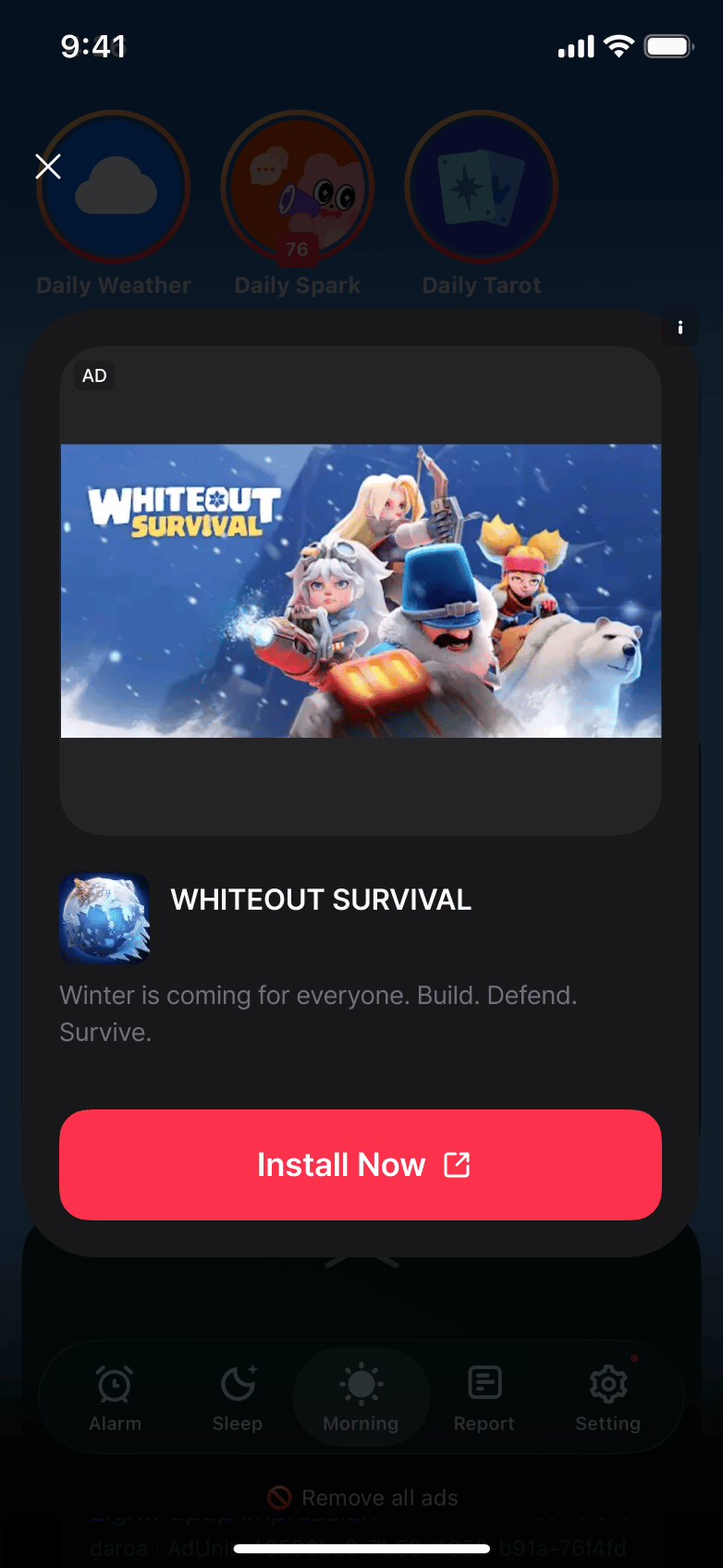
Ad Unit Setup
Configure your Ad Unit using the Ad Unit Key issued from the dashboard.- Swift
- Objective-C
let lightPopupAdUnit = DaroAdUnit(unitId: "your_light_popup_unit_id")
// In Objective-C, unitId is passed directly during initialization
NSString *lightPopupUnitId = @"your_light_popup_unit_id";
Light Popup Ad Implementation
- Swift
- Objective-C
class ExampleViewController: UIViewController {
    private var daroLightPopupAd: DaroLightPopupAd? = nil
    let daroLightPopupLoader = DaroLightPopupAdLoader(unit: lightPopupAdUnit)

    override func viewDidLoad() {
        super.viewDidLoad()
        setupLightPopupAd()
    }

    private func setupLightPopupAd() {
        // Ad click listener
        daroLightPopupLoader.listener.onAdClicked = { adInfo in
            print("[DARO] Listener Light Popup Ad clicked: \(adInfo)")
        }

        // Ad impression listener
        daroLightPopupLoader.listener.onAdImpression = { adInfo in
            print("[DARO] Listener Light Popup Ad impression: \(adInfo)")
        }

        // Ad load success listener
        daroLightPopupLoader.listener.onAdLoadSuccess = { [weak self] ad, adInfo in
            print("[DARO] Listener Light Popup Ad loaded: \(ad) \(adInfo)")
            self?.daroLightPopupAd = ad

            // Ad show success listener
            self?.daroLightPopupAd?.lightPopupAdListener.onShown = { adInfo in
                print("[DARO] Listener Light Popup Ad shown: \(adInfo)")
            }

            // Ad dismiss listener
            self?.daroLightPopupAd?.lightPopupAdListener.onDismiss = { adInfo in
                print("[DARO] Listener Light Popup Ad dismissed: \(adInfo)")
            }

            // Ad show fail listener
            self?.daroLightPopupAd?.lightPopupAdListener.onFailedToShow = { adInfo, error in
                print("[DARO] Listener Light Popup Ad failed to show: \(adInfo) \(error)")
            }
        }

        // Ad load fail listener
        daroLightPopupLoader.listener.onAdLoadFail = { error in
            print("[DARO] Listener Light Popup Ad failed: \(error)")
        }

        daroLightPopupLoader.loadAd()
    }

    private func showLightPopupAd() {
        daroLightPopupAd?.show(viewController: self)
    }
}
1. Adopt the delegate protocol in your header file:Retain the ad received in the load-success callback before showing it. The loader delegate receives load, click, and impression events; the ad delegate receives show, dismiss, and show-failure events. Apply configuration to the loaded ad before calling 3. Implement delegate methods:4. Show ad:
@interface ExampleViewController () <DaroObjCLightPopupAdLoaderDelegate, DaroObjCLightPopupAdDelegate>
@property (nonatomic, strong) DaroObjCLightPopupAdLoader *lightPopupLoader;
@property (nonatomic, strong) DaroObjCLightPopupAd *lightPopupAd;
@end
showFrom:. Load again for the next ad.2. Setup and load light popup ad:- (void)setupLightPopupAd {
self.lightPopupAd = nil;
self.lightPopupLoader = [[DaroObjCLightPopupAdLoader alloc]
initWithUnitId:@"your_light_popup_unit_id"];
self.lightPopupLoader.delegate = self;
// Load ad
[self.lightPopupLoader loadAd];
}
#pragma mark - DaroObjCLightPopupAdLoaderDelegate / DaroObjCLightPopupAdDelegate

- (void)lightPopupAdLoaderDidLoad:(DaroObjCLightPopupAdLoader *)loader
                              ad:(DaroObjCLightPopupAd *)ad
                          adInfo:(DaroObjCAdInfo *)adInfo {
    self.lightPopupAd = ad;
    ad.delegate = self;
    NSLog(@"[DARO] Light popup ad loaded - Unit: %@", adInfo.adUnitId);
}

- (void)lightPopupAdLoader:(DaroObjCLightPopupAdLoader *)loader
             didFailWithError:(NSError *)error {
    NSLog(@"[DARO] Failed to load: %@", error.localizedDescription);
}

- (void)lightPopupAdDidShow:(DaroObjCLightPopupAd *)ad
                     adInfo:(DaroObjCAdInfo *)adInfo {
    NSLog(@"[DARO] Light popup ad shown");
}

- (void)lightPopupAd:(DaroObjCLightPopupAd *)ad
              didFailToShow:(NSError *)error
                     adInfo:(DaroObjCAdInfo *)adInfo {
    NSLog(@"[DARO] Failed to show: %@", error.localizedDescription);
}

- (void)lightPopupAdLoaderDidClick:(DaroObjCLightPopupAdLoader *)loader
                      adInfo:(DaroObjCAdInfo *)adInfo {
    NSLog(@"[DARO] Light popup ad clicked");
}

- (void)lightPopupAdLoaderDidRecordImpression:(DaroObjCLightPopupAdLoader *)loader
                                 adInfo:(DaroObjCAdInfo *)adInfo {
    NSLog(@"[DARO] Impression recorded");
}

- (void)lightPopupAdDidDismiss:(DaroObjCLightPopupAd *)ad
                        adInfo:(DaroObjCAdInfo *)adInfo {
    NSLog(@"[DARO] Light popup ad dismissed");
    self.lightPopupAd = nil;
}
- (void)showLightPopupAd {
    if (self.lightPopupAd != nil) {
        [self.lightPopupAd showFrom:self];
    } else {
        NSLog(@"[DARO] Ad is not ready to show");
    }
}
Light Popup Configuration
You can customize the style of light popup ads:- Swift
- Objective-C
let configuration = DaroLightPopupConfiguration()

// Set background colors
configuration.backgroundColor = UIColor.black.withAlphaComponent(0.4) // Overall background color
configuration.cardViewBackgroundColor = .systemBackground // Card view background color

// Ad mark label settings
configuration.adMarkLabelTextColor = .secondaryLabel // Ad mark text color
configuration.adMarkLabelBackgroundColor = .secondarySystemBackground // Ad mark background color

// Close button settings
configuration.closeButtonText = "Close" // Close button text
configuration.closeButtonTextColor = .label // Close button text color

// Title settings
configuration.titleTextColor = .label // Title text color

// Body settings
configuration.bodyTextColor = .secondaryLabel // Body text color

// CTA button settings
configuration.ctaButtonTextColor = .white // CTA button text color
configuration.ctaButtonBackgroundColor = .systemBlue // CTA button background color

daroLightPopupAd?.configuration = configuration
DaroObjCLightPopupConfiguration *configuration = [[DaroObjCLightPopupConfiguration alloc] init];

// Set background colors
configuration.backgroundColor = [UIColor.blackColor colorWithAlphaComponent:0.4]; // Overall background color
configuration.cardViewBackgroundColor = UIColor.systemBackgroundColor; // Card view background color

// Ad mark label settings
configuration.adMarkLabelTextColor = UIColor.secondaryLabelColor; // Ad mark text color
configuration.adMarkLabelBackgroundColor = UIColor.secondarySystemBackgroundColor; // Ad mark background color

// Close button settings
configuration.closeButtonText = @"Close"; // Close button text
configuration.closeButtonTextColor = UIColor.labelColor; // Close button text color

// Title settings
configuration.titleTextColor = UIColor.labelColor; // Title text color

// Body settings
configuration.bodyTextColor = UIColor.secondaryLabelColor; // Body text color

// CTA button settings
configuration.ctaButtonTextColor = UIColor.whiteColor; // CTA button text color
configuration.ctaButtonBackgroundColor = UIColor.systemBlueColor; // CTA button background color

[self.lightPopupAd setConfiguration:configuration];