

Native Ad Format
- Ads rendered inside your app UI.
- Attach
DaroNativeAdViewto a Unity UI prefab and wire slots, or readDaroNativeAd.Infodirectly into custom UI.
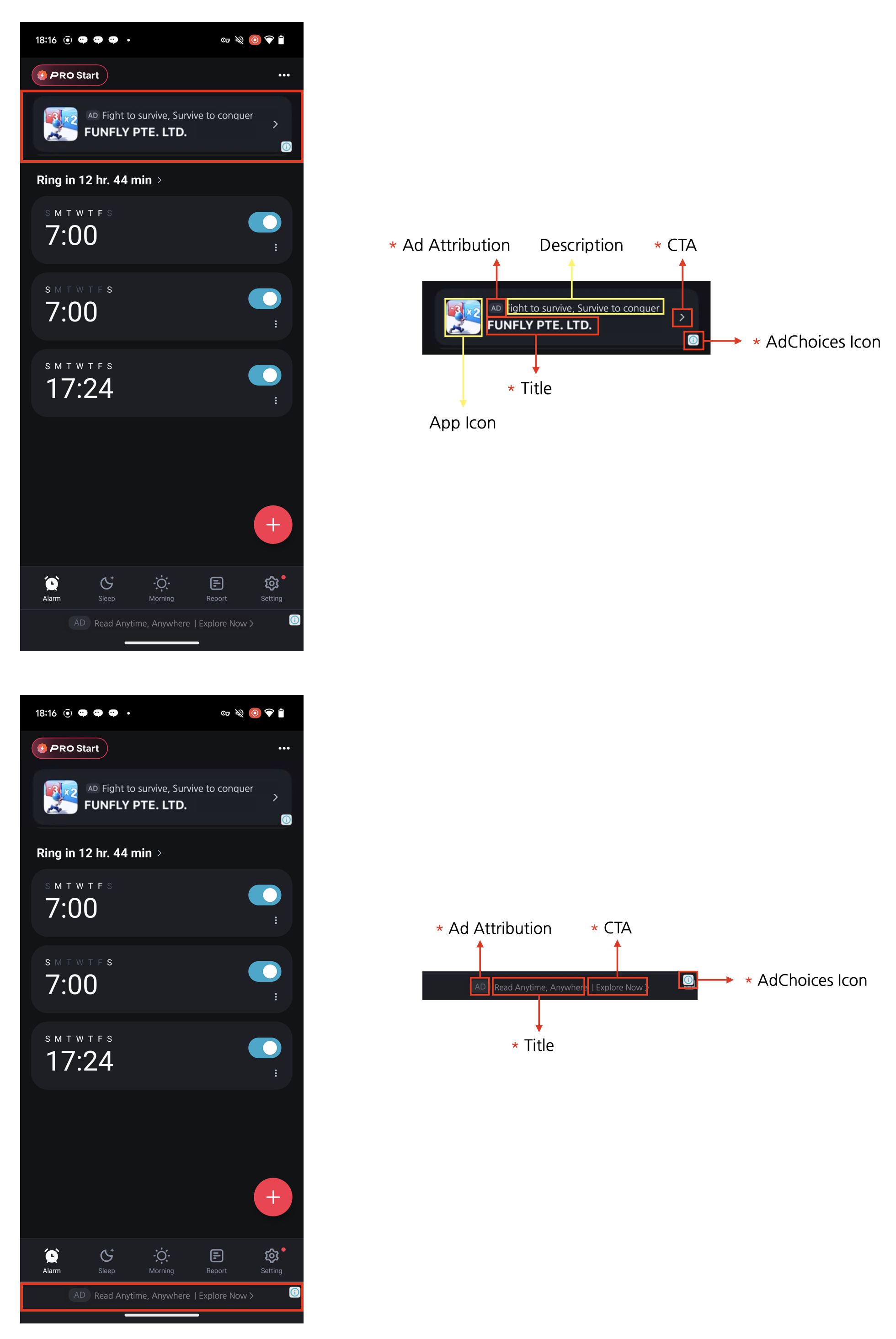
Integrating Ads
1
Prepare Native Ad View
Add
DaroNativeAdView to the Unity UI prefab root. Wire TitleText, BodyText, IconImage, CtaButton, and MediaContainer.MediaContainer is optional. When the bound ad has no media asset, DaroNativeAdView hides MediaContainer automatically.Bind(ad) also connects CtaButton taps to the native click flow on Android and iOS.2
Create Ad Instance
3
Register Event Handlers
4
Load Ad
5
Dispose Ad
Loading, visibility, and automatic refresh
LoadFor(ad) loads the ad; call Bind(ad) after loading to display it. On iOS, loading alone does not show the native ad overlay. Deactivating the bound view’s GameObject hides the native overlay and its touch area; reactivating it restores them. Call Unbind() and Dispose() when finished.
Automatic refresh follows the server configuration for the Ad Unit. A refresh interval of 0 disables periodic refresh; a positive interval enables it. Load callbacks may occur again after a single Load() call; this is not an error by itself. You do not need a separate ad instance for every refresh. Use the example’s OnAdLoaded handler to bind the latest ad, and receive clicks through OnAdClicked.
AdChoices placement
Starting with0.5.0-rc.4, you can specify the position in the constructor.
TopLeft, TopRight, BottomRight, and BottomLeft. Placement uses the entire RectTransform of DaroNativeAdView, so size it to cover the full ad area. The CTA and AdChoices areas are separate. The existing constructor without a position preserves the default placement.
The AdChoices UI supplied by individual ad demand sources may not follow the requested position. Some iOS ads have been observed displaying it on the right even when a left position was requested. Verify placement and touch behavior with the demand sources and screen orientations you use.
Example
Adapt the UI to received assets
- Use
DaroNativeAd.OnNativeAdAssetLoadedto handle missing assets. - The event type is
Action<ISet<NativeAdAssetType>>. You can also readISet<NativeAdAssetType>fromad.Info.AssetTypes. iconContaineris your icon UI container.
Advertiserreports availability only; there is no advertiser-name field inInfoor dedicated view slot.Mediais a receipt signal from the native SDK. Unity media texture delivery is unsupported, so do not assumeInfo.MediaImageexists based on this value.