Native Ad Format
- Unlike other ad formats where the SDK renders the complete ad view, native ads hand you the individual components so you build the ad view yourself inside your app.
- The main benefit is that you lay the ad out to match your own UI/UX, so it feels much less intrusive. To keep users from mistaking an ad for regular content, you must still give it a minimum level of visual differentiation along with an ad indicator.
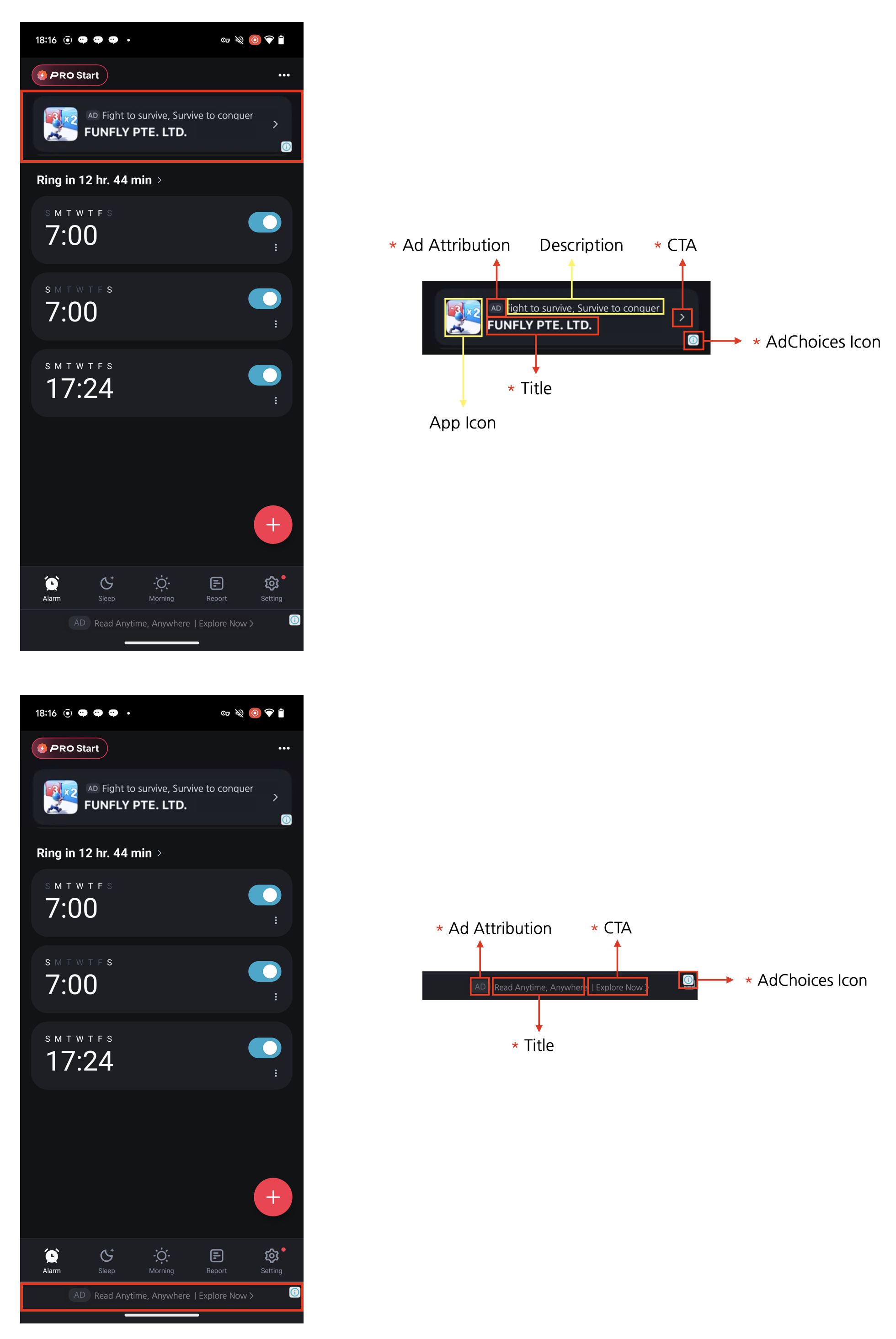
Four required native ad elementsYou are free to design a native ad to fit your app’s UI, but the four elements below are required. This is an ad policy: it keeps users aware that they are looking at an ad, and it guarantees the minimum ad performance advertisers expect.
- Ad indicator: add an “AD” or “Sponsored” label to the ad area so users can clearly tell it is an ad.
- AdChoices icon: the AdChoices icon lets users identify and control the ad, and is usually shown as an ’ⓘ’ glyph. The DARO SDK inserts it automatically so you do not implement it yourself, but lay out the ad view so that nothing covers it. Its shape and behavior can differ by ad demand source.
- Title: display the ad’s title.
- Call to action (CTA): always include a CTA button such as “Install”, “Open”, or “Download”. You can size and style the button freely, and replace it with a text field where that fits better. The ad demand source supplies the CTA copy, so do not hard-code your own.
Implementation
Creating the native ad view
NativeAdView loads an ad when the component mounts. To load another ad, call loadAd() on the ref.
AdChoices position
The SDK shows the AdChoices icon automatically. Use theadChoicesPosition prop to state where you would prefer it. When you omit it, bottomRight is used.
topLeft, topRight, bottomLeft, and bottomRight.
Adapt the UI to received assets
- Use the
onNativeAdAssetLoadedprop onNativeAdViewto handle missing assets. - The callback receives
ReadonlySet<NativeAdAssetType>. Check membership with.has().
- Keep asset views mounted and switch their display between
"none"and"flex"instead of conditionally removing them. - There is no dedicated React Native view component for
ADVERTISER. - Bridge callbacks are asynchronous and do not guarantee synchronous UI updates with the native view.