> ## Documentation Index
> Fetch the complete documentation index at: https://guide.daro.so/llms.txt
> Use this file to discover all available pages before exploring further.
# 인터스티셜 광고
> DARO를 통해 인터스티셜 광고를 구현하는 방법을 알아봅니다.
## 인터스티셜 광고 형태 소개
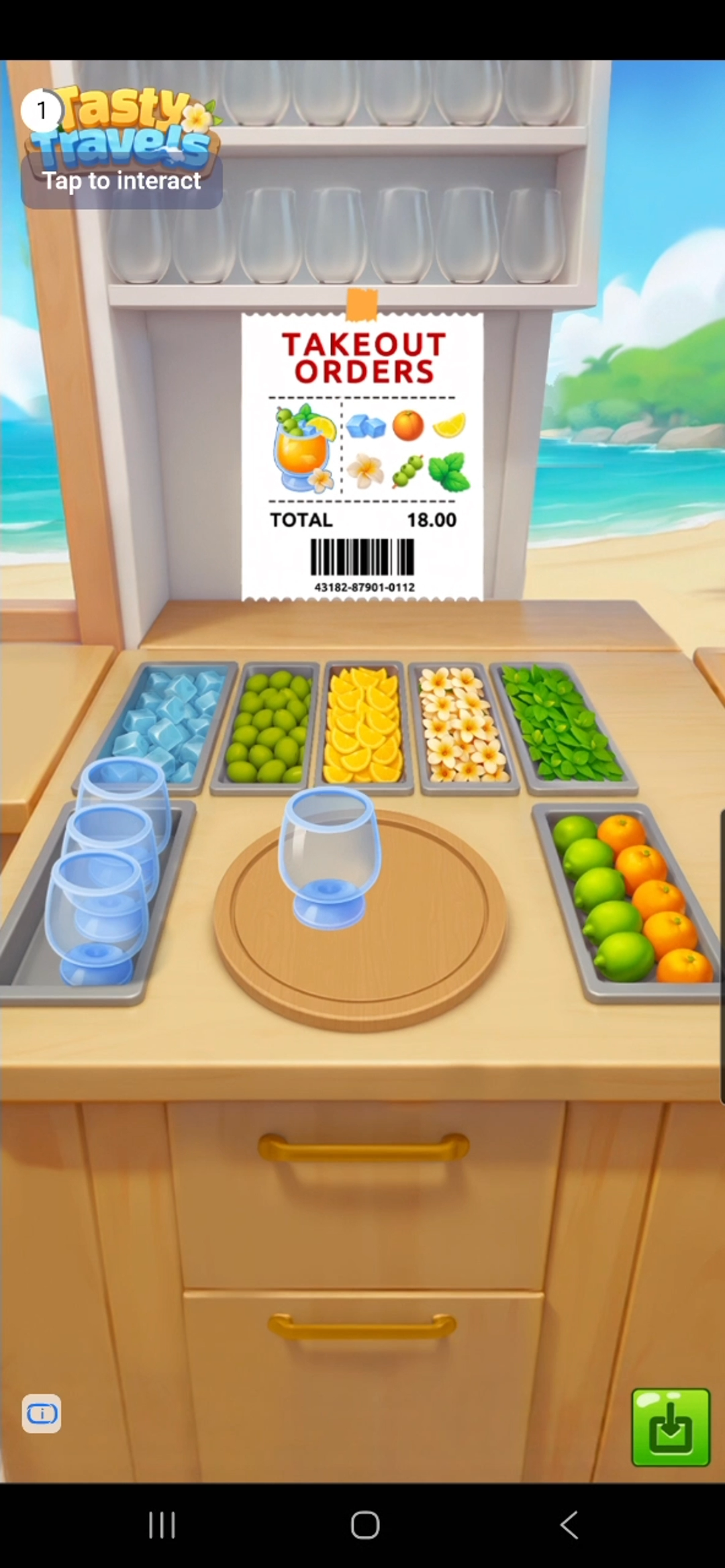
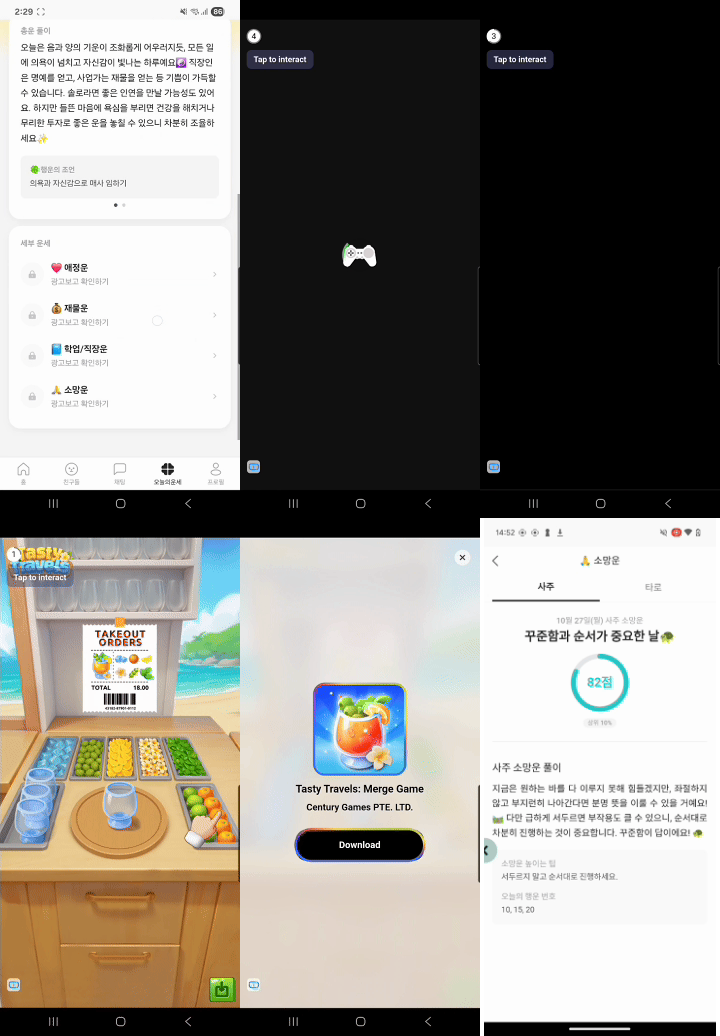
* 화면 전체를 덮는 형태로 노출되는 광고입니다.
* 이미지/동영상 모두 포함되나 동영상 소재가 더 많이 노출되며 일반적으로 5초 후부터 스킵이 가능합니다.
 ### How It Works
 ***
## 광고 단위 설정
대시보드에서 발급받은 `ad unit ID`를 사용하여 광고 단위를 설정하세요.
```swift theme={null}
let interstitialUnit = DaroAdUnit(unitId: "your_interstitial_unit_id")
```
```objc theme={null}
// Objective-C에서는 초기화 시 unitId를 직접 전달합니다
NSString *interstitialUnitId = @"your_interstitial_unit_id";
```
## 광고 구현
```swift theme={null}
class ExampleViewController: UIViewController {
private var daroInterstitialAd: DaroInterstitialAd? = nil
let daroInterstitialLoader = DaroInterstitialAdLoader(unit: interstitialUnit)
override func viewDidLoad() {
super.viewDidLoad()
setupInterstitialAd()
}
private func setupInterstitialAd() {
// 광고 로드 성공 리스너
daroInterstitialLoader.listener.onAdLoadSuccess = { [weak self] ad, adInfo in
print("[DARO] Listener Interstitial Ad loaded: \(ad) \(adInfo)")
self?.showAd(ad: ad)
}
// 광고 클릭 리스너
daroInterstitialLoader.listener.onAdClicked = { adInfo in
print("[DARO] Listener Interstitial Ad clicked: \(adInfo)")
}
// 광고 노출 리스너
daroInterstitialLoader.listener.onAdImpression = { adInfo in
print("[DARO] Listener Interstitial Ad impression: \(adInfo)")
}
// 광고 로드 실패 리스너
daroInterstitialLoader.listener.onAdLoadFail = { error in
print("[DARO] Listener Interstitial Ad failed: \(error)")
}
daroInterstitialLoader.loadAd()
}
private func showAd(ad: DaroInterstitialAd) {
self.daroInterstitialAd = ad
// 광고 표시 성공 리스너
self.daroInterstitialAd?.interstitialListener.onShown = { adInfo in
print("[DARO] Listener Interstitial Ad shown: \(adInfo)")
}
// 광고 닫힘 리스너
self.daroInterstitialAd?.interstitialListener.onDismiss = { adInfo in
print("[DARO] Listener Interstitial Ad dismissed: \(adInfo)")
}
// 광고 표시 실패 리스너
self.daroInterstitialAd?.interstitialListener.onFailedToShow = { adInfo, error in
print("[DARO] Listener Interstitial Ad failed to show: \(adInfo) \(error)")
}
showInterstitialAd()
}
private func showInterstitialAd() {
daroInterstitialAd?.show(viewController: self)
}
}
```
**1. 헤더 파일에서 delegate 프로토콜 채택:**
```objc theme={null}
@interface ExampleViewController ()
@property (nonatomic, strong) DaroObjCInterstitialAd *interstitialAd;
@end
```
**2. 인터스티셜 광고 설정 및 로드:**
```objc theme={null}
- (void)setupInterstitialAd {
self.interstitialAd = [[DaroObjCInterstitialAd alloc]
initWithAdUnitId:@"your_interstitial_unit_id"];
self.interstitialAd.delegate = self;
// 광고 로드
[self.interstitialAd load];
}
```
**3. Delegate 메서드 구현:**
```objc theme={null}
#pragma mark - DaroObjCInterstitialAdDelegate
- (void)interstitialAdDidLoad:(DaroObjCInterstitialAd *)ad
adInfo:(DaroObjCAdInfo *)adInfo {
NSLog(@"[DARO] Interstitial ad loaded - Unit: %@", adInfo.adUnitId);
}
- (void)interstitialAdDidFail:(DaroObjCInterstitialAd *)ad
toLoad:(NSError *)error {
NSLog(@"[DARO] Failed to load: %@", error.localizedDescription);
}
- (void)interstitialAdDidShow:(DaroObjCInterstitialAd *)ad
adInfo:(DaroObjCAdInfo *)adInfo {
NSLog(@"[DARO] Interstitial ad shown");
}
- (void)interstitialAdDidFail:(DaroObjCInterstitialAd *)ad
toShow:(DaroObjCAdInfo *)adInfo
error:(NSError *)error {
NSLog(@"[DARO] Failed to show: %@", error.localizedDescription);
}
- (void)interstitialAdDidClick:(DaroObjCInterstitialAd *)ad
adInfo:(DaroObjCAdInfo *)adInfo {
NSLog(@"[DARO] Interstitial ad clicked");
}
- (void)interstitialAdDidRecordImpression:(DaroObjCInterstitialAd *)ad
adInfo:(DaroObjCAdInfo *)adInfo {
NSLog(@"[DARO] Impression recorded");
}
- (void)interstitialAdDidDismiss:(DaroObjCInterstitialAd *)ad
adInfo:(DaroObjCAdInfo *)adInfo {
NSLog(@"[DARO] Interstitial ad dismissed");
}
```
**4. 광고 표시:**
```objc theme={null}
- (void)showInterstitialAd {
if (self.interstitialAd.isReady) {
[self.interstitialAd showFrom:self];
} else {
NSLog(@"[DARO] Ad is not ready to show");
}
}
```
***
## 트러블슈팅: 광고 닫기 버튼 겹침 이슈
DARO iOS SDK를 사용해 전면 광고를 표시할 때, 일부 광고 크리에이티브에서 상단 Safe Area 또는 Status Bar 영역과 UI가 겹쳐 보이는 현상이 발생할 수 있습니다.
아래는 광고가 표시되는 동안만 Status Bar를 숨기고, 광고 종료 시 원복하는 방법을 안내합니다.
**1. ViewController에 Status Bar 제어 프로퍼티 추가:**
```swift theme={null}
class ExampleViewController: UIViewController {
private var isAdShowing = false
override var prefersStatusBarHidden: Bool {
return isAdShowing
}
override var childForStatusBarHidden: UIViewController? {
return presentedViewController
}
}
```
**2. 광고 표시 전 Status Bar 숨기기 및 콜백에서 복구:**
```swift theme={null}
private func showAd(ad: DaroInterstitialAd) {
self.daroInterstitialAd = ad
self.daroInterstitialAd?.interstitialListener.onShown = { [weak self] adInfo in
print("[DARO] Interstitial Ad shown")
}
self.daroInterstitialAd?.interstitialListener.onDismiss = { [weak self] adInfo in
self?.isAdShowing = false
self?.setNeedsStatusBarAppearanceUpdate()
}
self.daroInterstitialAd?.interstitialListener.onFailedToShow = { [weak self] adInfo, error in
self?.isAdShowing = false
self?.setNeedsStatusBarAppearanceUpdate()
}
// show() 직전에 Status Bar 숨기기
isAdShowing = true
setNeedsStatusBarAppearanceUpdate()
daroInterstitialAd?.show(viewController: self)
}
```
**1. 헤더 파일에 프로퍼티 추가:**
```objc theme={null}
@interface ExampleViewController ()
@property (nonatomic, assign) BOOL adShowing;
@end
```
**2. Status Bar 제어 메서드 오버라이드:**
```objc theme={null}
- (BOOL)prefersStatusBarHidden {
return self.adShowing;
}
- (UIViewController *)childViewControllerForStatusBarHidden {
return self.presentedViewController;
}
```
**3. 광고 표시 전 숨기기 및 콜백에서 복구:**
```objc theme={null}
- (void)showInterstitialAd {
// show() 직전에 Status Bar 숨기기
self.adShowing = YES;
[self setNeedsStatusBarAppearanceUpdate];
[self.interstitialAd showFrom:self];
}
// 광고 닫힘 시 복구
- (void)interstitialAdDidDismiss:(DaroObjCInterstitialAd *)ad
adInfo:(DaroObjCAdInfo *)adInfo {
self.adShowing = NO;
[self setNeedsStatusBarAppearanceUpdate];
}
// 광고 표시 실패 시 복구
- (void)interstitialAdDidFail:(DaroObjCInterstitialAd *)ad
toShow:(DaroObjCAdInfo *)adInfo
error:(NSError *)error {
self.adShowing = NO;
[self setNeedsStatusBarAppearanceUpdate];
}
```
***
## 광고 단위 설정
대시보드에서 발급받은 `ad unit ID`를 사용하여 광고 단위를 설정하세요.
```swift theme={null}
let interstitialUnit = DaroAdUnit(unitId: "your_interstitial_unit_id")
```
```objc theme={null}
// Objective-C에서는 초기화 시 unitId를 직접 전달합니다
NSString *interstitialUnitId = @"your_interstitial_unit_id";
```
## 광고 구현
```swift theme={null}
class ExampleViewController: UIViewController {
private var daroInterstitialAd: DaroInterstitialAd? = nil
let daroInterstitialLoader = DaroInterstitialAdLoader(unit: interstitialUnit)
override func viewDidLoad() {
super.viewDidLoad()
setupInterstitialAd()
}
private func setupInterstitialAd() {
// 광고 로드 성공 리스너
daroInterstitialLoader.listener.onAdLoadSuccess = { [weak self] ad, adInfo in
print("[DARO] Listener Interstitial Ad loaded: \(ad) \(adInfo)")
self?.showAd(ad: ad)
}
// 광고 클릭 리스너
daroInterstitialLoader.listener.onAdClicked = { adInfo in
print("[DARO] Listener Interstitial Ad clicked: \(adInfo)")
}
// 광고 노출 리스너
daroInterstitialLoader.listener.onAdImpression = { adInfo in
print("[DARO] Listener Interstitial Ad impression: \(adInfo)")
}
// 광고 로드 실패 리스너
daroInterstitialLoader.listener.onAdLoadFail = { error in
print("[DARO] Listener Interstitial Ad failed: \(error)")
}
daroInterstitialLoader.loadAd()
}
private func showAd(ad: DaroInterstitialAd) {
self.daroInterstitialAd = ad
// 광고 표시 성공 리스너
self.daroInterstitialAd?.interstitialListener.onShown = { adInfo in
print("[DARO] Listener Interstitial Ad shown: \(adInfo)")
}
// 광고 닫힘 리스너
self.daroInterstitialAd?.interstitialListener.onDismiss = { adInfo in
print("[DARO] Listener Interstitial Ad dismissed: \(adInfo)")
}
// 광고 표시 실패 리스너
self.daroInterstitialAd?.interstitialListener.onFailedToShow = { adInfo, error in
print("[DARO] Listener Interstitial Ad failed to show: \(adInfo) \(error)")
}
showInterstitialAd()
}
private func showInterstitialAd() {
daroInterstitialAd?.show(viewController: self)
}
}
```
**1. 헤더 파일에서 delegate 프로토콜 채택:**
```objc theme={null}
@interface ExampleViewController ()
@property (nonatomic, strong) DaroObjCInterstitialAd *interstitialAd;
@end
```
**2. 인터스티셜 광고 설정 및 로드:**
```objc theme={null}
- (void)setupInterstitialAd {
self.interstitialAd = [[DaroObjCInterstitialAd alloc]
initWithAdUnitId:@"your_interstitial_unit_id"];
self.interstitialAd.delegate = self;
// 광고 로드
[self.interstitialAd load];
}
```
**3. Delegate 메서드 구현:**
```objc theme={null}
#pragma mark - DaroObjCInterstitialAdDelegate
- (void)interstitialAdDidLoad:(DaroObjCInterstitialAd *)ad
adInfo:(DaroObjCAdInfo *)adInfo {
NSLog(@"[DARO] Interstitial ad loaded - Unit: %@", adInfo.adUnitId);
}
- (void)interstitialAdDidFail:(DaroObjCInterstitialAd *)ad
toLoad:(NSError *)error {
NSLog(@"[DARO] Failed to load: %@", error.localizedDescription);
}
- (void)interstitialAdDidShow:(DaroObjCInterstitialAd *)ad
adInfo:(DaroObjCAdInfo *)adInfo {
NSLog(@"[DARO] Interstitial ad shown");
}
- (void)interstitialAdDidFail:(DaroObjCInterstitialAd *)ad
toShow:(DaroObjCAdInfo *)adInfo
error:(NSError *)error {
NSLog(@"[DARO] Failed to show: %@", error.localizedDescription);
}
- (void)interstitialAdDidClick:(DaroObjCInterstitialAd *)ad
adInfo:(DaroObjCAdInfo *)adInfo {
NSLog(@"[DARO] Interstitial ad clicked");
}
- (void)interstitialAdDidRecordImpression:(DaroObjCInterstitialAd *)ad
adInfo:(DaroObjCAdInfo *)adInfo {
NSLog(@"[DARO] Impression recorded");
}
- (void)interstitialAdDidDismiss:(DaroObjCInterstitialAd *)ad
adInfo:(DaroObjCAdInfo *)adInfo {
NSLog(@"[DARO] Interstitial ad dismissed");
}
```
**4. 광고 표시:**
```objc theme={null}
- (void)showInterstitialAd {
if (self.interstitialAd.isReady) {
[self.interstitialAd showFrom:self];
} else {
NSLog(@"[DARO] Ad is not ready to show");
}
}
```
***
## 트러블슈팅: 광고 닫기 버튼 겹침 이슈
DARO iOS SDK를 사용해 전면 광고를 표시할 때, 일부 광고 크리에이티브에서 상단 Safe Area 또는 Status Bar 영역과 UI가 겹쳐 보이는 현상이 발생할 수 있습니다.
아래는 광고가 표시되는 동안만 Status Bar를 숨기고, 광고 종료 시 원복하는 방법을 안내합니다.
**1. ViewController에 Status Bar 제어 프로퍼티 추가:**
```swift theme={null}
class ExampleViewController: UIViewController {
private var isAdShowing = false
override var prefersStatusBarHidden: Bool {
return isAdShowing
}
override var childForStatusBarHidden: UIViewController? {
return presentedViewController
}
}
```
**2. 광고 표시 전 Status Bar 숨기기 및 콜백에서 복구:**
```swift theme={null}
private func showAd(ad: DaroInterstitialAd) {
self.daroInterstitialAd = ad
self.daroInterstitialAd?.interstitialListener.onShown = { [weak self] adInfo in
print("[DARO] Interstitial Ad shown")
}
self.daroInterstitialAd?.interstitialListener.onDismiss = { [weak self] adInfo in
self?.isAdShowing = false
self?.setNeedsStatusBarAppearanceUpdate()
}
self.daroInterstitialAd?.interstitialListener.onFailedToShow = { [weak self] adInfo, error in
self?.isAdShowing = false
self?.setNeedsStatusBarAppearanceUpdate()
}
// show() 직전에 Status Bar 숨기기
isAdShowing = true
setNeedsStatusBarAppearanceUpdate()
daroInterstitialAd?.show(viewController: self)
}
```
**1. 헤더 파일에 프로퍼티 추가:**
```objc theme={null}
@interface ExampleViewController ()
@property (nonatomic, assign) BOOL adShowing;
@end
```
**2. Status Bar 제어 메서드 오버라이드:**
```objc theme={null}
- (BOOL)prefersStatusBarHidden {
return self.adShowing;
}
- (UIViewController *)childViewControllerForStatusBarHidden {
return self.presentedViewController;
}
```
**3. 광고 표시 전 숨기기 및 콜백에서 복구:**
```objc theme={null}
- (void)showInterstitialAd {
// show() 직전에 Status Bar 숨기기
self.adShowing = YES;
[self setNeedsStatusBarAppearanceUpdate];
[self.interstitialAd showFrom:self];
}
// 광고 닫힘 시 복구
- (void)interstitialAdDidDismiss:(DaroObjCInterstitialAd *)ad
adInfo:(DaroObjCAdInfo *)adInfo {
self.adShowing = NO;
[self setNeedsStatusBarAppearanceUpdate];
}
// 광고 표시 실패 시 복구
- (void)interstitialAdDidFail:(DaroObjCInterstitialAd *)ad
toShow:(DaroObjCAdInfo *)adInfo
error:(NSError *)error {
self.adShowing = NO;
[self setNeedsStatusBarAppearanceUpdate];
}
```