> ## Documentation Index
> Fetch the complete documentation index at: https://guide.daro.so/llms.txt
> Use this file to discover all available pages before exploring further.
# 라이트 팝업 광고
> DARO를 통해 라이트 팝업 광고를 구현하는 방법을 알아봅니다.
[SDK 초기화](/ko/sdk-integration-v2/ios_new/get-started#sdk-초기화하기)가 성공한 뒤 광고를 로드하세요. Swift 예제는 `import Daro`가 필요하며, Objective-C 예제는 `DaroObjCBridge`를 사용합니다. 기존 연동은 [마이그레이션 가이드](/ko/sdk-integration-v2/ios_new/migration-guide)를 먼저 확인하세요.
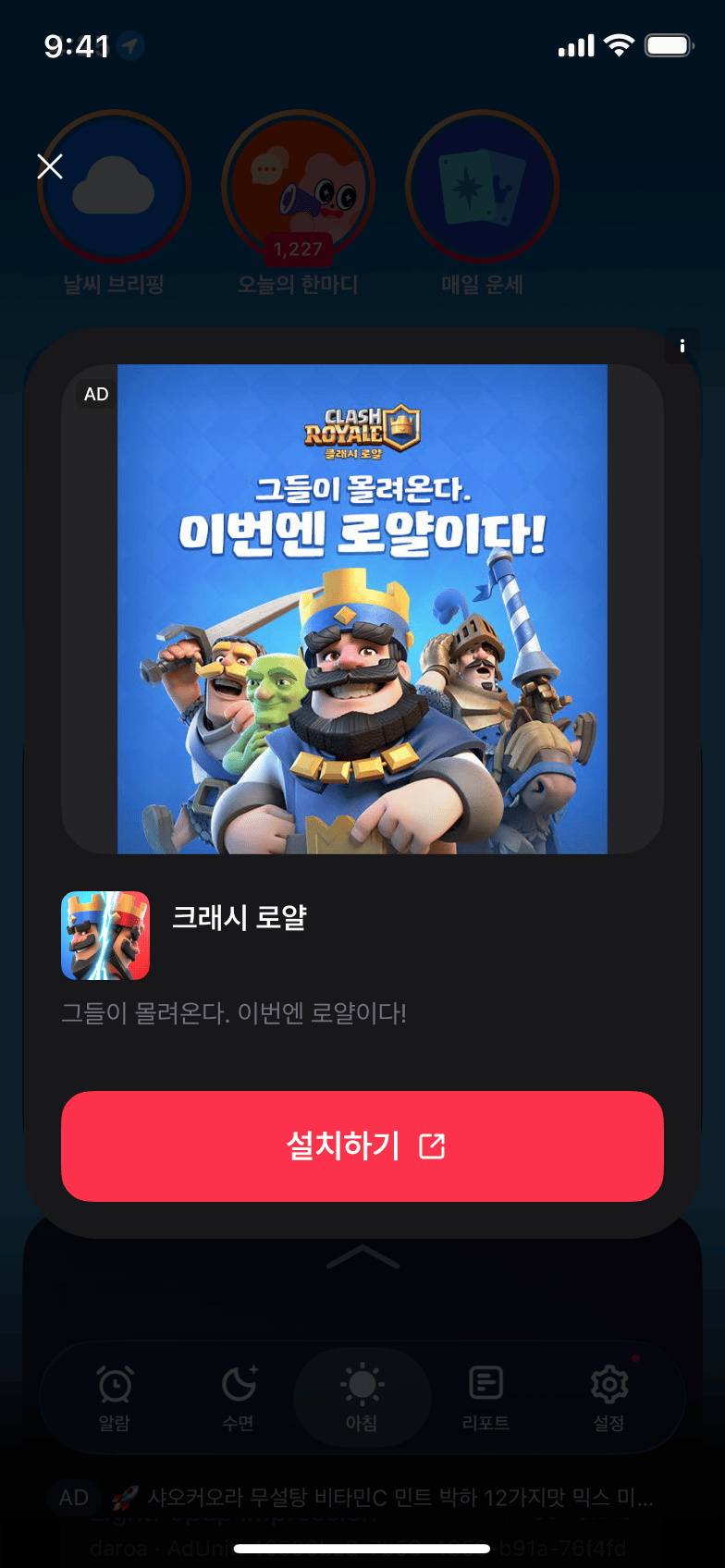
## 라이트 팝업 광고 형태 소개
* 화면 전체를 사용하는 광고 유형입니다.
* 앱 화면 위에 팝업 형태로 광고를 표시합니다.
 ***
## 애드유닛 설정
대시보드에서 발급받은 Ad Unit Key를 사용하여 애드유닛을 설정하세요.
```swift theme={null}
let lightPopupAdUnit = DaroAdUnit(unitId: "your_light_popup_unit_id")
```
```objc theme={null}
// Objective-C에서는 초기화 시 unitId를 직접 전달합니다
NSString *lightPopupUnitId = @"your_light_popup_unit_id";
```
***
## 라이트 팝업 광고 구현
```swift theme={null}
class ExampleViewController: UIViewController {
private var daroLightPopupAd: DaroLightPopupAd? = nil
let daroLightPopupLoader = DaroLightPopupAdLoader(unit: lightPopupAdUnit)
override func viewDidLoad() {
super.viewDidLoad()
setupLightPopupAd()
}
private func setupLightPopupAd() {
// 광고 클릭 리스너
daroLightPopupLoader.listener.onAdClicked = { adInfo in
print("[DARO] Listener Light Popup Ad clicked: \(adInfo)")
}
// 광고 노출 리스너
daroLightPopupLoader.listener.onAdImpression = { adInfo in
print("[DARO] Listener Light Popup Ad impression: \(adInfo)")
}
// 광고 로드 성공 리스너
daroLightPopupLoader.listener.onAdLoadSuccess = { [weak self] ad, adInfo in
print("[DARO] Listener Light Popup Ad loaded: \(ad) \(adInfo)")
self?.daroLightPopupAd = ad
// 광고 표시 성공 리스너
self?.daroLightPopupAd?.lightPopupAdListener.onShown = { adInfo in
print("[DARO] Listener Light Popup Ad shown: \(adInfo)")
}
// 광고 닫힘 리스너
self?.daroLightPopupAd?.lightPopupAdListener.onDismiss = { adInfo in
print("[DARO] Listener Light Popup Ad dismissed: \(adInfo)")
}
// 광고 표시 실패 리스너
self?.daroLightPopupAd?.lightPopupAdListener.onFailedToShow = { adInfo, error in
print("[DARO] Listener Light Popup Ad failed to show: \(adInfo) \(error)")
}
}
// 광고 로드 실패 리스너
daroLightPopupLoader.listener.onAdLoadFail = { error in
print("[DARO] Listener Light Popup Ad failed: \(error)")
}
daroLightPopupLoader.loadAd()
}
private func showLightPopupAd() {
daroLightPopupAd?.show(viewController: self)
}
}
```
**1. 헤더 파일에서 delegate 프로토콜 채택:**
```objc theme={null}
@interface ExampleViewController ()
@property (nonatomic, strong) DaroObjCLightPopupAdLoader *lightPopupLoader;
@property (nonatomic, strong) DaroObjCLightPopupAd *lightPopupAd;
@end
```
로드 성공 콜백에서 받은 광고를 보관한 뒤 표시하세요. 로드·클릭·노출 이벤트는 loader delegate가, 표시·닫힘·표시 실패 이벤트는 ad delegate가 받습니다. 설정은 로드된 광고에 적용한 뒤 `showFrom:`을 호출하세요. 다음 광고를 표시하려면 다시 로드하세요.
**2. 라이트 팝업 광고 설정 및 로드:**
```objc theme={null}
- (void)setupLightPopupAd {
self.lightPopupAd = nil;
self.lightPopupLoader = [[DaroObjCLightPopupAdLoader alloc]
initWithUnitId:@"your_light_popup_unit_id"];
self.lightPopupLoader.delegate = self;
// 광고 로드
[self.lightPopupLoader loadAd];
}
```
**3. Delegate 메서드 구현:**
```objc theme={null}
#pragma mark - DaroObjCLightPopupAdLoaderDelegate / DaroObjCLightPopupAdDelegate
- (void)lightPopupAdLoaderDidLoad:(DaroObjCLightPopupAdLoader *)loader
ad:(DaroObjCLightPopupAd *)ad
adInfo:(DaroObjCAdInfo *)adInfo {
self.lightPopupAd = ad;
ad.delegate = self;
NSLog(@"[DARO] Light popup ad loaded - Unit: %@", adInfo.adUnitId);
}
- (void)lightPopupAdLoader:(DaroObjCLightPopupAdLoader *)loader
didFailWithError:(NSError *)error {
NSLog(@"[DARO] Failed to load: %@", error.localizedDescription);
}
- (void)lightPopupAdDidShow:(DaroObjCLightPopupAd *)ad
adInfo:(DaroObjCAdInfo *)adInfo {
NSLog(@"[DARO] Light popup ad shown");
}
- (void)lightPopupAd:(DaroObjCLightPopupAd *)ad
didFailToShow:(NSError *)error
adInfo:(DaroObjCAdInfo *)adInfo {
NSLog(@"[DARO] Failed to show: %@", error.localizedDescription);
}
- (void)lightPopupAdLoaderDidClick:(DaroObjCLightPopupAdLoader *)loader
adInfo:(DaroObjCAdInfo *)adInfo {
NSLog(@"[DARO] Light popup ad clicked");
}
- (void)lightPopupAdLoaderDidRecordImpression:(DaroObjCLightPopupAdLoader *)loader
adInfo:(DaroObjCAdInfo *)adInfo {
NSLog(@"[DARO] Impression recorded");
}
- (void)lightPopupAdDidDismiss:(DaroObjCLightPopupAd *)ad
adInfo:(DaroObjCAdInfo *)adInfo {
NSLog(@"[DARO] Light popup ad dismissed");
self.lightPopupAd = nil;
}
```
**4. 광고 표시:**
```objc theme={null}
- (void)showLightPopupAd {
if (self.lightPopupAd != nil) {
[self.lightPopupAd showFrom:self];
} else {
NSLog(@"[DARO] Ad is not ready to show");
}
}
```
## 라이트 팝업 설정
라이트 팝업 광고의 스타일을 커스터마이징할 수 있습니다:
```swift theme={null}
let configuration = DaroLightPopupConfiguration()
// 배경색 설정
configuration.backgroundColor = UIColor.black.withAlphaComponent(0.4) // 전체 배경색
configuration.cardViewBackgroundColor = .systemBackground // 카드 뷰 배경색
// 광고 마크 라벨 설정
configuration.adMarkLabelTextColor = .secondaryLabel // 광고 마크 텍스트 색상
configuration.adMarkLabelBackgroundColor = .secondarySystemBackground // 광고 마크 배경색
// 닫기 버튼 설정
configuration.closeButtonText = "Close" // 닫기 버튼 텍스트
configuration.closeButtonTextColor = .label // 닫기 버튼 텍스트 색상
// 제목 설정
configuration.titleTextColor = .label // 제목 텍스트 색상
// 본문 설정
configuration.bodyTextColor = .secondaryLabel // 본문 텍스트 색상
// CTA 버튼 설정
configuration.ctaButtonTextColor = .white // CTA 버튼 텍스트 색상
configuration.ctaButtonBackgroundColor = .systemBlue // CTA 버튼 배경색
daroLightPopupAd?.configuration = configuration
```
```objc theme={null}
DaroObjCLightPopupConfiguration *configuration = [[DaroObjCLightPopupConfiguration alloc] init];
// 배경색 설정
configuration.backgroundColor = [UIColor.blackColor colorWithAlphaComponent:0.4]; // 전체 배경색
configuration.cardViewBackgroundColor = UIColor.systemBackgroundColor; // 카드 뷰 배경색
// 광고 마크 라벨 설정
configuration.adMarkLabelTextColor = UIColor.secondaryLabelColor; // 광고 마크 텍스트 색상
configuration.adMarkLabelBackgroundColor = UIColor.secondarySystemBackgroundColor; // 광고 마크 배경색
// 닫기 버튼 설정
configuration.closeButtonText = @"Close"; // 닫기 버튼 텍스트
configuration.closeButtonTextColor = UIColor.labelColor; // 닫기 버튼 텍스트 색상
// 제목 설정
configuration.titleTextColor = UIColor.labelColor; // 제목 텍스트 색상
// 본문 설정
configuration.bodyTextColor = UIColor.secondaryLabelColor; // 본문 텍스트 색상
// CTA 버튼 설정
configuration.ctaButtonTextColor = UIColor.whiteColor; // CTA 버튼 텍스트 색상
configuration.ctaButtonBackgroundColor = UIColor.systemBlueColor; // CTA 버튼 배경색
[self.lightPopupAd setConfiguration:configuration];
```
***
## 애드유닛 설정
대시보드에서 발급받은 Ad Unit Key를 사용하여 애드유닛을 설정하세요.
```swift theme={null}
let lightPopupAdUnit = DaroAdUnit(unitId: "your_light_popup_unit_id")
```
```objc theme={null}
// Objective-C에서는 초기화 시 unitId를 직접 전달합니다
NSString *lightPopupUnitId = @"your_light_popup_unit_id";
```
***
## 라이트 팝업 광고 구현
```swift theme={null}
class ExampleViewController: UIViewController {
private var daroLightPopupAd: DaroLightPopupAd? = nil
let daroLightPopupLoader = DaroLightPopupAdLoader(unit: lightPopupAdUnit)
override func viewDidLoad() {
super.viewDidLoad()
setupLightPopupAd()
}
private func setupLightPopupAd() {
// 광고 클릭 리스너
daroLightPopupLoader.listener.onAdClicked = { adInfo in
print("[DARO] Listener Light Popup Ad clicked: \(adInfo)")
}
// 광고 노출 리스너
daroLightPopupLoader.listener.onAdImpression = { adInfo in
print("[DARO] Listener Light Popup Ad impression: \(adInfo)")
}
// 광고 로드 성공 리스너
daroLightPopupLoader.listener.onAdLoadSuccess = { [weak self] ad, adInfo in
print("[DARO] Listener Light Popup Ad loaded: \(ad) \(adInfo)")
self?.daroLightPopupAd = ad
// 광고 표시 성공 리스너
self?.daroLightPopupAd?.lightPopupAdListener.onShown = { adInfo in
print("[DARO] Listener Light Popup Ad shown: \(adInfo)")
}
// 광고 닫힘 리스너
self?.daroLightPopupAd?.lightPopupAdListener.onDismiss = { adInfo in
print("[DARO] Listener Light Popup Ad dismissed: \(adInfo)")
}
// 광고 표시 실패 리스너
self?.daroLightPopupAd?.lightPopupAdListener.onFailedToShow = { adInfo, error in
print("[DARO] Listener Light Popup Ad failed to show: \(adInfo) \(error)")
}
}
// 광고 로드 실패 리스너
daroLightPopupLoader.listener.onAdLoadFail = { error in
print("[DARO] Listener Light Popup Ad failed: \(error)")
}
daroLightPopupLoader.loadAd()
}
private func showLightPopupAd() {
daroLightPopupAd?.show(viewController: self)
}
}
```
**1. 헤더 파일에서 delegate 프로토콜 채택:**
```objc theme={null}
@interface ExampleViewController ()
@property (nonatomic, strong) DaroObjCLightPopupAdLoader *lightPopupLoader;
@property (nonatomic, strong) DaroObjCLightPopupAd *lightPopupAd;
@end
```
로드 성공 콜백에서 받은 광고를 보관한 뒤 표시하세요. 로드·클릭·노출 이벤트는 loader delegate가, 표시·닫힘·표시 실패 이벤트는 ad delegate가 받습니다. 설정은 로드된 광고에 적용한 뒤 `showFrom:`을 호출하세요. 다음 광고를 표시하려면 다시 로드하세요.
**2. 라이트 팝업 광고 설정 및 로드:**
```objc theme={null}
- (void)setupLightPopupAd {
self.lightPopupAd = nil;
self.lightPopupLoader = [[DaroObjCLightPopupAdLoader alloc]
initWithUnitId:@"your_light_popup_unit_id"];
self.lightPopupLoader.delegate = self;
// 광고 로드
[self.lightPopupLoader loadAd];
}
```
**3. Delegate 메서드 구현:**
```objc theme={null}
#pragma mark - DaroObjCLightPopupAdLoaderDelegate / DaroObjCLightPopupAdDelegate
- (void)lightPopupAdLoaderDidLoad:(DaroObjCLightPopupAdLoader *)loader
ad:(DaroObjCLightPopupAd *)ad
adInfo:(DaroObjCAdInfo *)adInfo {
self.lightPopupAd = ad;
ad.delegate = self;
NSLog(@"[DARO] Light popup ad loaded - Unit: %@", adInfo.adUnitId);
}
- (void)lightPopupAdLoader:(DaroObjCLightPopupAdLoader *)loader
didFailWithError:(NSError *)error {
NSLog(@"[DARO] Failed to load: %@", error.localizedDescription);
}
- (void)lightPopupAdDidShow:(DaroObjCLightPopupAd *)ad
adInfo:(DaroObjCAdInfo *)adInfo {
NSLog(@"[DARO] Light popup ad shown");
}
- (void)lightPopupAd:(DaroObjCLightPopupAd *)ad
didFailToShow:(NSError *)error
adInfo:(DaroObjCAdInfo *)adInfo {
NSLog(@"[DARO] Failed to show: %@", error.localizedDescription);
}
- (void)lightPopupAdLoaderDidClick:(DaroObjCLightPopupAdLoader *)loader
adInfo:(DaroObjCAdInfo *)adInfo {
NSLog(@"[DARO] Light popup ad clicked");
}
- (void)lightPopupAdLoaderDidRecordImpression:(DaroObjCLightPopupAdLoader *)loader
adInfo:(DaroObjCAdInfo *)adInfo {
NSLog(@"[DARO] Impression recorded");
}
- (void)lightPopupAdDidDismiss:(DaroObjCLightPopupAd *)ad
adInfo:(DaroObjCAdInfo *)adInfo {
NSLog(@"[DARO] Light popup ad dismissed");
self.lightPopupAd = nil;
}
```
**4. 광고 표시:**
```objc theme={null}
- (void)showLightPopupAd {
if (self.lightPopupAd != nil) {
[self.lightPopupAd showFrom:self];
} else {
NSLog(@"[DARO] Ad is not ready to show");
}
}
```
## 라이트 팝업 설정
라이트 팝업 광고의 스타일을 커스터마이징할 수 있습니다:
```swift theme={null}
let configuration = DaroLightPopupConfiguration()
// 배경색 설정
configuration.backgroundColor = UIColor.black.withAlphaComponent(0.4) // 전체 배경색
configuration.cardViewBackgroundColor = .systemBackground // 카드 뷰 배경색
// 광고 마크 라벨 설정
configuration.adMarkLabelTextColor = .secondaryLabel // 광고 마크 텍스트 색상
configuration.adMarkLabelBackgroundColor = .secondarySystemBackground // 광고 마크 배경색
// 닫기 버튼 설정
configuration.closeButtonText = "Close" // 닫기 버튼 텍스트
configuration.closeButtonTextColor = .label // 닫기 버튼 텍스트 색상
// 제목 설정
configuration.titleTextColor = .label // 제목 텍스트 색상
// 본문 설정
configuration.bodyTextColor = .secondaryLabel // 본문 텍스트 색상
// CTA 버튼 설정
configuration.ctaButtonTextColor = .white // CTA 버튼 텍스트 색상
configuration.ctaButtonBackgroundColor = .systemBlue // CTA 버튼 배경색
daroLightPopupAd?.configuration = configuration
```
```objc theme={null}
DaroObjCLightPopupConfiguration *configuration = [[DaroObjCLightPopupConfiguration alloc] init];
// 배경색 설정
configuration.backgroundColor = [UIColor.blackColor colorWithAlphaComponent:0.4]; // 전체 배경색
configuration.cardViewBackgroundColor = UIColor.systemBackgroundColor; // 카드 뷰 배경색
// 광고 마크 라벨 설정
configuration.adMarkLabelTextColor = UIColor.secondaryLabelColor; // 광고 마크 텍스트 색상
configuration.adMarkLabelBackgroundColor = UIColor.secondarySystemBackgroundColor; // 광고 마크 배경색
// 닫기 버튼 설정
configuration.closeButtonText = @"Close"; // 닫기 버튼 텍스트
configuration.closeButtonTextColor = UIColor.labelColor; // 닫기 버튼 텍스트 색상
// 제목 설정
configuration.titleTextColor = UIColor.labelColor; // 제목 텍스트 색상
// 본문 설정
configuration.bodyTextColor = UIColor.secondaryLabelColor; // 본문 텍스트 색상
// CTA 버튼 설정
configuration.ctaButtonTextColor = UIColor.whiteColor; // CTA 버튼 텍스트 색상
configuration.ctaButtonBackgroundColor = UIColor.systemBlueColor; // CTA 버튼 배경색
[self.lightPopupAd setConfiguration:configuration];
```