> ## Documentation Index
> Fetch the complete documentation index at: https://guide.daro.so/llms.txt
> Use this file to discover all available pages before exploring further.
# Native Ads
> Implement native ads in your Android app.
## Native Ad Format
Native ads provide individual ad components that you implement directly in your app's layout, unlike other formats where the SDK provides the complete ad view.
**Advantages**: Customize the layout to match your UI/UX and minimize visual disruption.
**Requirements**: Include an ad indicator and maintain visual differentiation to prevent users from confusing ads with content.
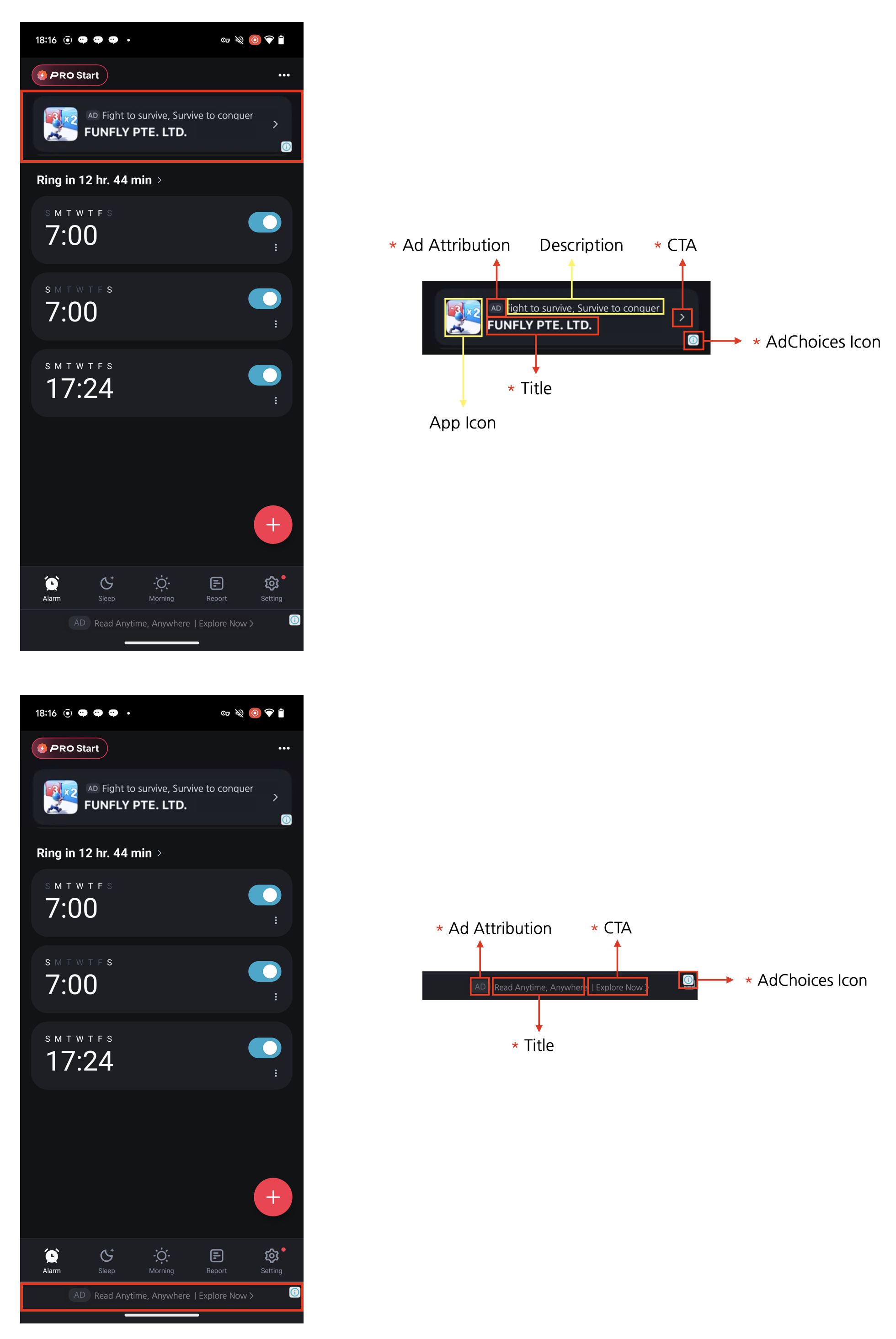 **Four Required Elements for Native Ads**
Native ads can be designed to complement the content and look of your app. However, **the following four required elements must be included.** These elements are necessary to clearly mark native ads as advertisements so that users don't mistake them for content, and to ensure the minimum advertising effectiveness expected by advertisers.
1. Ad attribution: You must clearly display ad attribution text such as "Ad", "Advertisement", or "Sponsored" (localized appropriately) in the ad area so users can clearly identify the content as advertising.
2. AdChoices icon: The AdChoices overlay icon enables users to identify and control ads, typically displayed as an 'ⓘ' icon. This icon is automatically added by the DARO SDK, so no separate implementation is required. It is placed in one of the four corners of the ad view (top-left, top-right, bottom-right, bottom-left), with bottom-right as the default. For Non-Reward apps using Manual Implementation(XML), you can pick the corner via `DaroNativeAdBinder.Builder.setAdChoicePlacement()` (see the [AdChoices placement](#adchoices-placement) section below). Please lay out your ad view so the selected corner is not overlapped or obscured by other UI elements. The icon's appearance and behavior may vary depending on the ad source (demand).
3. Title: The ad title must be displayed.
4. CTA (Call to action): A CTA button with text such as "Install", "Open", or "Download" must be included. The size and format of the button can be freely configured, and it can be replaced with a text field depending on the situation. Since the ad source (demand) provides the CTA text, there is no need to specify fixed wording.
***
## Integrating Ads
* Create an adBinder needed to render native ads.
```kotlin xml theme={null}
val adBinder = DaroNativeAdBinder.Builder(context, ${layoutId})
.setIconViewId(${iconViewId})
.setBodyTextViewId(${bodyViewId})
.setCallToActionViewId(${callToActionViewId})
.setMediaViewGroupId(${mediaViewGroupId})
.setTitleViewId(${titleViewId})
.setAdChoicePlacement(DaroNativeAdChoicePlacement.BOTTOM_RIGHT) // optional, defaults to BOTTOM_RIGHT
.build()
```
```kotlin programmatic theme={null}
val view = View()
val adBinder = DaroNativeAdBinder.Builder(view)
.setIconViewId(${iconViewId})
.setBodyTextViewId(${bodyViewId})
.setCallToActionViewId(${callToActionViewId})
.setMediaViewGroupId(${mediaViewGroupId})
.setTitleViewId(${titleViewId})
.build()
```
**Four Required Elements for Native Ads**
Native ads can be designed to complement the content and look of your app. However, **the following four required elements must be included.** These elements are necessary to clearly mark native ads as advertisements so that users don't mistake them for content, and to ensure the minimum advertising effectiveness expected by advertisers.
1. Ad attribution: You must clearly display ad attribution text such as "Ad", "Advertisement", or "Sponsored" (localized appropriately) in the ad area so users can clearly identify the content as advertising.
2. AdChoices icon: The AdChoices overlay icon enables users to identify and control ads, typically displayed as an 'ⓘ' icon. This icon is automatically added by the DARO SDK, so no separate implementation is required. It is placed in one of the four corners of the ad view (top-left, top-right, bottom-right, bottom-left), with bottom-right as the default. For Non-Reward apps using Manual Implementation(XML), you can pick the corner via `DaroNativeAdBinder.Builder.setAdChoicePlacement()` (see the [AdChoices placement](#adchoices-placement) section below). Please lay out your ad view so the selected corner is not overlapped or obscured by other UI elements. The icon's appearance and behavior may vary depending on the ad source (demand).
3. Title: The ad title must be displayed.
4. CTA (Call to action): A CTA button with text such as "Install", "Open", or "Download" must be included. The size and format of the button can be freely configured, and it can be replaced with a text field depending on the situation. Since the ad source (demand) provides the CTA text, there is no need to specify fixed wording.
***
## Integrating Ads
* Create an adBinder needed to render native ads.
```kotlin xml theme={null}
val adBinder = DaroNativeAdBinder.Builder(context, ${layoutId})
.setIconViewId(${iconViewId})
.setBodyTextViewId(${bodyViewId})
.setCallToActionViewId(${callToActionViewId})
.setMediaViewGroupId(${mediaViewGroupId})
.setTitleViewId(${titleViewId})
.setAdChoicePlacement(DaroNativeAdChoicePlacement.BOTTOM_RIGHT) // optional, defaults to BOTTOM_RIGHT
.build()
```
```kotlin programmatic theme={null}
val view = View()
val adBinder = DaroNativeAdBinder.Builder(view)
.setIconViewId(${iconViewId})
.setBodyTextViewId(${bodyViewId})
.setCallToActionViewId(${callToActionViewId})
.setMediaViewGroupId(${mediaViewGroupId})
.setTitleViewId(${titleViewId})
.build()
```
 ```xml layout_native.xml expandable theme={null}
```
```kotlin MainActivity.kt theme={null}
val adBinder = DaroNativeAdBinder.Builder(this, droom.daro.m.R.layout.layout_native)
.setIconViewId(droom.daro.m.R.id.view_icon)
.setBodyTextViewId(droom.daro.m.R.id.view_body)
.setCallToActionViewId(droom.daro.m.R.id.button_cta)
.setMediaViewGroupId(droom.daro.m.R.id.view_media)
.setTitleViewId(droom.daro.m.R.id.view_title)
.build()
```
```kotlin theme={null}
val adBinder = DaroNativeAdBinder.fromTemplate(
context,
DaroNativeAdTemplate.Banner(
...
)
)
```
```kotlin theme={null}
val adUnit = DaroNativeAdUnit(
key = ${AdUnitId},
placement = ${placement}, //Name displayed in logs. Can be left empty.
)
```
```kotlin theme={null}
val adView = DaroNativeAdView(
context = context,
adUnit = adUnit
)
binding.adViewContainer.addView(adView)
```
```kotlin theme={null}
adView.setAdBinder(adBinder)
```
```kotlin theme={null}
adView.setListener(object : DaroAdViewListener {
override fun onAdImpression(adInfo: DaroAdInfo) {}
override fun onAdClicked(adInfo: DaroAdInfo) {}
override fun onAdLoadSuccess(ad: DaroViewAd, adInfo: DaroAdInfo) {}
override fun onAdLoadFail(err: DaroAdLoadError) {}
})
```
```kotlin theme={null}
adView.loadAd()
```
You must set `adBinder` before calling `loadAd()`.
* When you declare a view, it automatically detects the appropriate lifecycle for the screen and manages its behavior. You don't need to manually call `resume`, `pause`, or `destroy`.
* If you set `autoDetectLifecycle` to false (default: true), you must manually call `resume`, `pause`, and `destroy`.
```kotlin Manual implementation(Compose) theme={null}
DaroNative(
adUnit = DaroNativeAdUnit(
key = ${AdUnitId},
placement = ${placement}
),
listener = object : DaroAdViewListener {
override fun onAdImpression(adInfo: DaroAdInfo) {}
override fun onAdClicked(adInfo: DaroAdInfo) {}
override fun onAdLoadSuccess(ad: DaroViewAd, adInfo: DaroAdInfo) {}
override fun onAdLoadFail(err: DaroAdLoadError) {}
},
modifier = Modifier
) {
DaroNativeAdTitle { title -> Text(title) } // for title
DaroNativeAdBody { body -> Text(body) } // for body
DaroNativeCallToAction { callToAction -> Text(callToAction) } // for callToAction
DaroNativeIcon(modifier = Modifier.size(40.dp)) // for ImageView
DaroNativeMedia(modifier = Modifier.size(100.dp)) // for MedaiView
}
```
```kotlin Use Template theme={null}
DaroNative(
adUnit = DaroNativeAdUnit(
key = ${AdUnitId},
placement = ${placement}
),
modifier = Modifier,
listener = object : DaroAdViewListener {
override fun onAdImpression(adInfo: DaroAdInfo) {}
override fun onAdClicked(adInfo: DaroAdInfo) {}
override fun onAdLoadSuccess(ad: DaroViewAd, adInfo: DaroAdInfo) {}
override fun onAdLoadFail(err: DaroAdLoadError) {}
},
template = DaroNativeAdTemplate.Line(
...
)
)
```
You can preload ads without creating an ad view using the `DaroNativeAdView.requestPreload()` method.
```kotlin theme={null}
DaroNativeAdView.requestPreload(
this,
DaroNativeAdUnit(
key = ${AdUnitId},
placement = ${placement},
)
)
```
To use the preloaded ad immediately, both the `AdUnitId` and `placement` of the DaroNativeAdUnit used in the view must match.
***
## AdChoices placement
* Use `DaroNativeAdBinder.Builder.setAdChoicePlacement()` to control where the AdChoices icon is rendered.
* If unset, it defaults to the bottom-right corner (`BOTTOM_RIGHT`).
* Supported values: `TOP_LEFT`, `TOP_RIGHT`, `BOTTOM_LEFT`, `BOTTOM_RIGHT`.
This option is only available for Non-Reward apps via the Manual Implementation(XML). Template and Reward apps use the default value.
For Reward apps, calling `setAdChoicePlacement()` does not actually change the AdChoices icon position.
**Behavior varies by demand source (preferred, not guaranteed)**
`setAdChoicePlacement()` asks the demand source to place the AdChoices icon at the specified position. However, where it actually appears is decided by each demand source, so the requested position is not always honored.
Demand sources may respond differently:
* Some demand sources honor the requested position as-is.
* Some demand sources ignore the request and use their own fixed position.
* Some demand sources replace the AdChoices icon with their own ad indicator (such as an ad badge).
In every case, the relevant ad compliance requirements are satisfied.
Therefore, when designing your ad layout, **assume the AdChoices icon or ad badge can appear in any of the four corners** and reserve sufficient padding around each corner.
***
## Template
* The Daro SDK provides the following templates.
```xml layout_native.xml expandable theme={null}
```
```kotlin MainActivity.kt theme={null}
val adBinder = DaroNativeAdBinder.Builder(this, droom.daro.m.R.layout.layout_native)
.setIconViewId(droom.daro.m.R.id.view_icon)
.setBodyTextViewId(droom.daro.m.R.id.view_body)
.setCallToActionViewId(droom.daro.m.R.id.button_cta)
.setMediaViewGroupId(droom.daro.m.R.id.view_media)
.setTitleViewId(droom.daro.m.R.id.view_title)
.build()
```
```kotlin theme={null}
val adBinder = DaroNativeAdBinder.fromTemplate(
context,
DaroNativeAdTemplate.Banner(
...
)
)
```
```kotlin theme={null}
val adUnit = DaroNativeAdUnit(
key = ${AdUnitId},
placement = ${placement}, //Name displayed in logs. Can be left empty.
)
```
```kotlin theme={null}
val adView = DaroNativeAdView(
context = context,
adUnit = adUnit
)
binding.adViewContainer.addView(adView)
```
```kotlin theme={null}
adView.setAdBinder(adBinder)
```
```kotlin theme={null}
adView.setListener(object : DaroAdViewListener {
override fun onAdImpression(adInfo: DaroAdInfo) {}
override fun onAdClicked(adInfo: DaroAdInfo) {}
override fun onAdLoadSuccess(ad: DaroViewAd, adInfo: DaroAdInfo) {}
override fun onAdLoadFail(err: DaroAdLoadError) {}
})
```
```kotlin theme={null}
adView.loadAd()
```
You must set `adBinder` before calling `loadAd()`.
* When you declare a view, it automatically detects the appropriate lifecycle for the screen and manages its behavior. You don't need to manually call `resume`, `pause`, or `destroy`.
* If you set `autoDetectLifecycle` to false (default: true), you must manually call `resume`, `pause`, and `destroy`.
```kotlin Manual implementation(Compose) theme={null}
DaroNative(
adUnit = DaroNativeAdUnit(
key = ${AdUnitId},
placement = ${placement}
),
listener = object : DaroAdViewListener {
override fun onAdImpression(adInfo: DaroAdInfo) {}
override fun onAdClicked(adInfo: DaroAdInfo) {}
override fun onAdLoadSuccess(ad: DaroViewAd, adInfo: DaroAdInfo) {}
override fun onAdLoadFail(err: DaroAdLoadError) {}
},
modifier = Modifier
) {
DaroNativeAdTitle { title -> Text(title) } // for title
DaroNativeAdBody { body -> Text(body) } // for body
DaroNativeCallToAction { callToAction -> Text(callToAction) } // for callToAction
DaroNativeIcon(modifier = Modifier.size(40.dp)) // for ImageView
DaroNativeMedia(modifier = Modifier.size(100.dp)) // for MedaiView
}
```
```kotlin Use Template theme={null}
DaroNative(
adUnit = DaroNativeAdUnit(
key = ${AdUnitId},
placement = ${placement}
),
modifier = Modifier,
listener = object : DaroAdViewListener {
override fun onAdImpression(adInfo: DaroAdInfo) {}
override fun onAdClicked(adInfo: DaroAdInfo) {}
override fun onAdLoadSuccess(ad: DaroViewAd, adInfo: DaroAdInfo) {}
override fun onAdLoadFail(err: DaroAdLoadError) {}
},
template = DaroNativeAdTemplate.Line(
...
)
)
```
You can preload ads without creating an ad view using the `DaroNativeAdView.requestPreload()` method.
```kotlin theme={null}
DaroNativeAdView.requestPreload(
this,
DaroNativeAdUnit(
key = ${AdUnitId},
placement = ${placement},
)
)
```
To use the preloaded ad immediately, both the `AdUnitId` and `placement` of the DaroNativeAdUnit used in the view must match.
***
## AdChoices placement
* Use `DaroNativeAdBinder.Builder.setAdChoicePlacement()` to control where the AdChoices icon is rendered.
* If unset, it defaults to the bottom-right corner (`BOTTOM_RIGHT`).
* Supported values: `TOP_LEFT`, `TOP_RIGHT`, `BOTTOM_LEFT`, `BOTTOM_RIGHT`.
This option is only available for Non-Reward apps via the Manual Implementation(XML). Template and Reward apps use the default value.
For Reward apps, calling `setAdChoicePlacement()` does not actually change the AdChoices icon position.
**Behavior varies by demand source (preferred, not guaranteed)**
`setAdChoicePlacement()` asks the demand source to place the AdChoices icon at the specified position. However, where it actually appears is decided by each demand source, so the requested position is not always honored.
Demand sources may respond differently:
* Some demand sources honor the requested position as-is.
* Some demand sources ignore the request and use their own fixed position.
* Some demand sources replace the AdChoices icon with their own ad indicator (such as an ad badge).
In every case, the relevant ad compliance requirements are satisfied.
Therefore, when designing your ad layout, **assume the AdChoices icon or ad badge can appear in any of the four corners** and reserve sufficient padding around each corner.
***
## Template
* The Daro SDK provides the following templates.
 Overall background color
Content text color
Ad mark background color
Ad mark text color
Overall background color
Content text color
Ad mark background color
Ad mark text color
 Overall background color
Content text color
Ad mark background color
Ad mark text color
Overall background color
Content text color
Ad mark background color
Ad mark text color
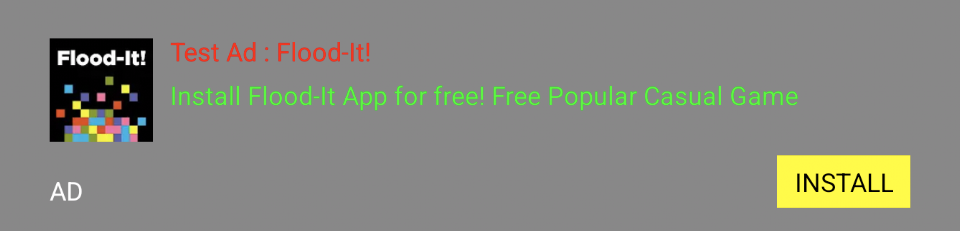 Overall background color
Title text color
Description text color
CTA (button) background color
CTA (button) text color
Bottom ad mark text color
Overall background color
Title text color
Description text color
CTA (button) background color
CTA (button) text color
Bottom ad mark text color